Email Validation API vs Email Verification API: What Buyers Actually Need
Email validation API and email verification API are used as synonyms in search. Soryxa returns allow, block, or review with reason codes. Do not treat a syntax check or an SMTP probe as the same job.

Buyers search for email validation API and email verification API when evaluating many of the same products. Vendors use both terms, but the underlying checks and response models can differ.
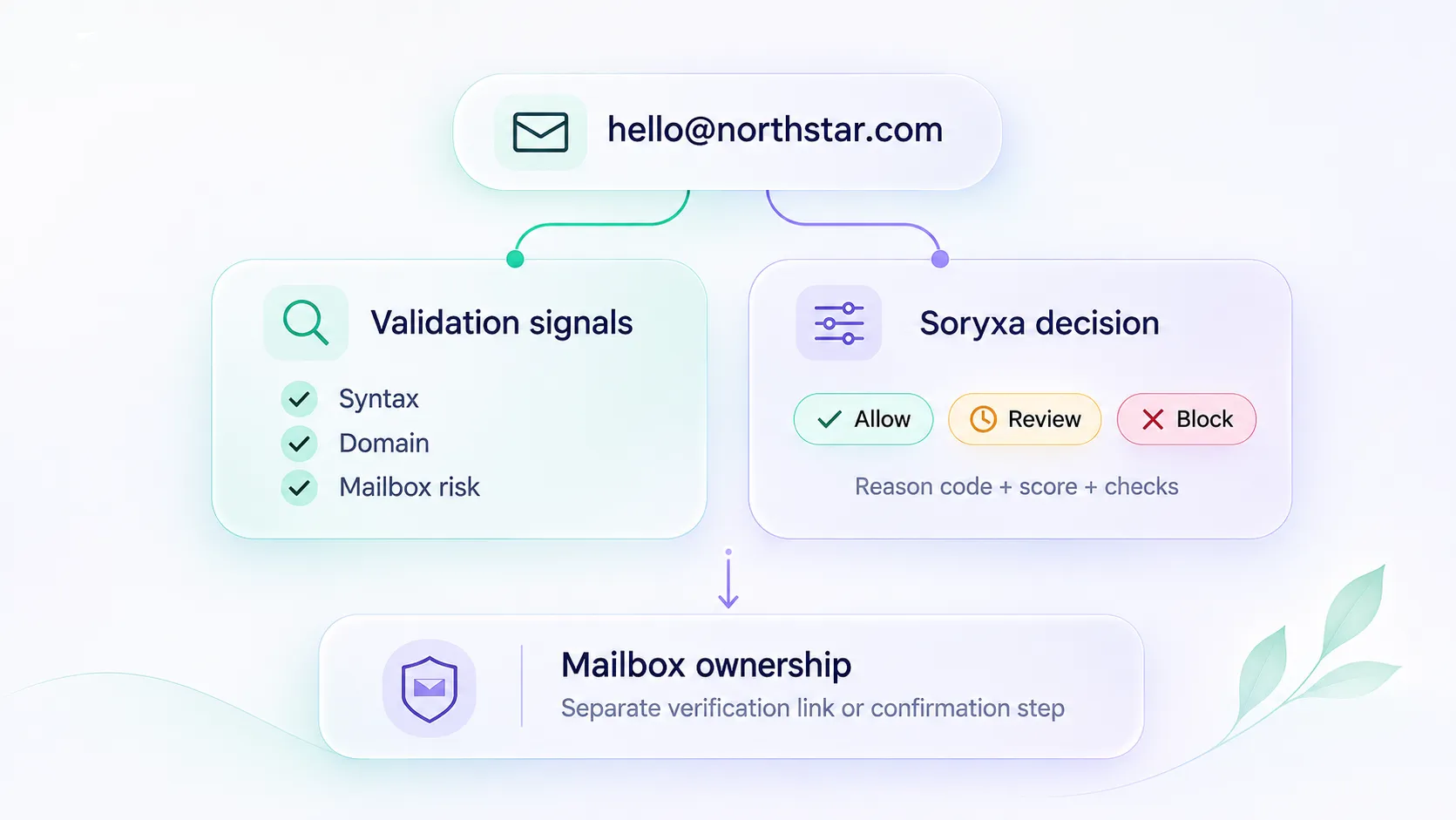
Some APIs focus on syntax and domain checks. Others return mailbox-risk classifications. Soryxa adds an application decision layer: allow, block, or review, with a stable reason_code.
The useful question is not which term appears on the pricing page. It is what the API can establish and what your application needs to do with the result.
What people usually mean
| Phrase | What buyers may be looking for | What to check |
|---|---|---|
| Email validation API | Syntax, domain, mailbox-risk signals, or application decisions | Which checks and decision fields does the API return? |
| Email verification API | Mailbox validity and deliverability-risk signals | What can the API establish, and how does it represent uncertainty? |
| Email syntax check | Whether an address follows an accepted format | Does it check anything beyond syntax? |
| Mailbox ownership verification | Whether a user can access the submitted mailbox | Is there a verification-link or equivalent confirmation flow? |
Soryxa fits the application-decision use case. It combines validation signals and risk scoring with a configurable decision layer, returning decision, reason_code, score, and checks[].
It is not a guarantee that a message will be delivered, and it is not an email-finding product.
The fields that matter for routing
From the validate email endpoint:
data.decision—allow,block, orreviewdata.reason_code— stable machine-readable reasondata.decision_message— for logsdata.score— 0–100 after team rule adjustmentsdata.checks[]— named checks with status and messageusage.remaining/usage.limit
Header X-Soryxa-Reason-Code echoes reason_code if you route from headers.
Use decision first, then reason_code for analytics and special cases. Do not invent a fourth decision.
Validation vs "did SMTP say OK"
Mailbox probes and catch-all domains are noisy. A catch-all can accept SMTP and still be the wrong address for signup.
Soryxa turns provider classification and team-configured rules into allow, block, or review. Disposable or free-provider patterns can be blocked or sent to review according to those rules. The optional policy_key labels the calling workflow but does not select a separate ruleset.
If you only store a boolean "valid," you cannot explain that difference later. Related: Why email validation fails without clear decision rules.
Questions to ask before choosing an API
Before choosing a provider, establish what your workflow actually needs:
- Does the API check syntax, domain records, mailbox-risk signals, or all three?
- Does it return evidence only, or an application-ready decision?
- How are catch-all, disposable, role-based, and uncertain results represented?
- What happens when validation cannot complete?
- Can your application preserve the original result, reason code, and decision history?
- Do you need to assess mailbox quality, or prove that the user controls the address?
A signup gate and a mailing-list cleanup job may use the same provider while requiring different handling rules. Neither use case should assume that an API can guarantee delivery or prove mailbox ownership.
Reason codes you will actually branch on
Examples from the reason code reference:
CLASSIFICATION_VALID— allowCLASSIFICATION_INVALID— blockCLASSIFICATION_RISKY— reviewBLOCK_DISPOSABLE,BLOCK_ROLE_ACCOUNT,BLOCK_FREE_PROVIDER— block when your rules say soSERVICE_UNAVAILABLEindicates that the validation service was unavailable, so Soryxa returns areviewfallback rather than classifying the mailbox as invalid.
API request failures, such as authentication or usage-limit errors, require separate error handling. They are not email-quality decisions.
Implementation checklist
- Call Soryxa from the backend. Never put the bearer token in browser code.
- Normalize and trim the address first.
- Persist
decision,reason_code, andscoreon the record you care about. - Handle
reviewas a real path (queue, extra step), not as silent allow. - For lists, use batch validation instead of looping the real-time endpoint without a job.
- If the workflow requires proof of mailbox control, send a verification link or use another explicit confirmation step. Validation results alone do not prove ownership.
Validation signals describe what is known about an address. Application policy determines what to do with that evidence. Mailbox ownership requires a separate confirmation step.
Choose the API based on which of those responsibilities your workflow actually needs.