Input
Company name plus context
Company name and optional context such as location, industry, or keywords.
Resolve company names to likely official domains with explainable reasons, confidence from 1-100 when found or 0 for a completed no-match, and nullable reachability.
Short answer: use Company Domain Lookup to find a company domain from a company name. Found matches always include confidence from 1-100, completed no-match outcomes return 0, and errors include no confidence score. Use that contract to decide whether CRM automation should write, review, or hold the result.
domain
acmecorp.com
confidence
92/100
is_live
Reachable
lower_reasons[]
Review signal
Multiple similar companies can lower confidence.
68 /100
Request
POST /api/prospecting/company
Authorization: Bearer YOUR_API_KEY
Content-Type: application/json

{
  "company_name": "Acme Corp",
  "additional_context": "New York, manufacturing"
}
Input
Company name and optional context such as location, industry, or keywords.
Output
Likely official domain with confidence from 1-100 when found, confidence 0 for a completed no-match, nullable is_live, explainable match reasons, and cached-result status. Errors include no confidence score.
Nullable LinkedIn URL, industry, sub-industry, and sector fields are included when available.
Review path
Accept high-confidence matches or review when confidence is lower.
Boundary
Company-name to official-website matching for names you already have. Not a people or inbox product.
How teams run lookup
Use the API when domain resolution belongs in code. After sign-in, enter one company name in the dashboard's Find Domain form for a one-off lookup, or import a list for bulk processing and review. The one-company lookup runs in the background, the page updates automatically, and you can leave and return before its five-minute processing window ends. Transient service failures are retried within that window.
API automation
Call the lookup endpoint from CRM imports, onboarding flows, or scheduled jobs before dedupe, enrichment, routing, and reporting use the record.
View API ->Dashboard workflow
Use Find Domain for one company without keeping the page open, or process imported records and review confidence signals before CRM automation writes, reviews, or holds a result.
Create Account ->Explainable domain candidates with explicit routing and review guidance.
| Capability | What it returns | How teams use it |
|---|---|---|
| Confidence routing | Completed outcomes return an ordinal score, confidence_band, and review_recommended. Errors omit these fields. | Set policies for auto-accept, review, low-score hold, or no match without treating the score as a calibrated probability. |
| Explainable reasons | See why the domain was matched. | Official website match, name similarity, context match, and more. |
| Domain reachability | See whether the domain appeared reachable when evaluated. | Check cached before treating reachability as fresh. |
| Optional company context | Nullable LinkedIn URL, industry, sub-industry, and sector fields. | Reuse provider context when it is returned. |
| Review bands | Use the exact high, review, low, and no_match confidence_band values. | Bulk processing uses confidence 85-100 as its score-only automatic-verification test; lower scores remain unverified. |
| CRM matching ready | Clean, normalized domain output. | Easy to dedupe, enrich, and merge. |
Simple to integrate. Transparent results.
POST /api/prospecting/company
Authorization: Bearer YOUR_API_KEY
Content-Type: application/json

{
  "company_name": "Acme Corp",
  "additional_context": "New York, manufacturing"
}{
"success": true,
"message": "Company lookup completed",
"company_name": "Acme Corp",
"normalized_company_name": "acme corp",
"domain": "acmecorp.com",
"linkedin_url": "https://www.linkedin.com/company/acme-corp",
"industry": "Industrial Machinery",
"sub_industry": "Industrial Equipment",
"sector": "Industrials",
"confidence": 92,
"confidence_band": "high",
"review_recommended": false,
"is_live": true,
"reasons": [
"Official website match",
"Name similarity high"
],
"lower_reasons": [],
"cached": false,
"found": true,
"remaining": 9,
"limit": 10
}Shortened example. View the full response fields.
| Confidence | Action | Typical use |
|---|---|---|
| high (85-100) | Auto-accept | Score-derived high band |
| review (60-84) | Review | Verify before routing |
| low (1-59) | Investigate | Keep unchanged when uncertain |
| no_match (0) | Hold | Keep the domain blank |
Treat confidence as a routing signal, not as permission to overwrite trusted CRM fields on every row. For fresh bulk results, 85-100 is high and passes the score-only automatic-verification test, 60-84 is review, 1-59 is low, and 0 is no_match. Returned reasons and lower_reasons explain the result but do not change its score-derived band. A prior incorrect team decision can still force Needs Review; errors include no confidence score.
CRM mapping: company name, domain, confidence, reasons, live-domain status, and optional LinkedIn or industry context.
Developer resources
Use the versioned contract, runnable examples, or official PHP package to evaluate authentication, lookup outcomes, confidence routing, credit behavior, and retry handling.
API contract
Contract for token checks and company lookup, including routing bands, credit behavior, request tracing, and error variants.
View YAML →Request collection
Runnable bearer-auth, found, no-match, validation, credit-limit, and retryable-error examples with contract checks.
Open collection →Official package
Official Composer package elvesora/domain-lookup-php. Packagist exposes v1.0.0 from the official repository.
View package →Official package
Official Laravel 12 and 13 package with auto-discovery, dependency injection, a facade, typed results, and typed exceptions.
View package →Methodology and sources
Domain Lookup claims are grounded in the public API contract, match-confidence guidance, and the benchmark-methodology page. Keep reviewer decisions tied to the returned confidence, reasons, is_live, and cached status instead of treating every match as an automatic CRM overwrite.
Publisher: Elvesora. Reviewed by Elvesora product team. Last updated August 17, 2026.
Review scope, inputs, confidence policy, and limits for domain matching claims.
Inspect request fields, response fields, confidence values, and review-ready outputs.
Connect the API contract to CRM cleanup, routing, and enrichment workflows.
See how verified domains support dedupe, enrichment, and ownership decisions.
Use Domain Lookup to find the likely official domain.
Pass the reviewed domain to enrichment for firmographic data.
Use the domain as a stable key for deduplication and merges.
Send clean, verified records to downstream systems.
Start free with the API that resolves company identity with confidence.
Use verified company domains to support cleaner routing, dedupe, enrichment, and CRM standardization jobs.
Common questions about resolving company names to likely official domains before enrichment, routing, and CRM cleanup.
A found match returns the most likely official company domain, explainable reasons, and confidence from 1-100. A completed no-match returns confidence 0, while errors include no confidence score. Reachability remains nullable; check cached before treating it as fresh.
Yes. Submit a company name and optional context. A found match returns a likely official website domain, reasons, and confidence 1–100. A completed no-match returns confidence 0. It does not return owner records, personal inboxes, or people profiles.
Run domain lookup before enrichment, dedupe, routing, or account ownership logic so downstream systems use the reviewed company domain instead of a messy name string.
Confidence scoring gives teams a practical signal for whether a match can be automated or should be reviewed before it updates CRM or enrichment data.
No. Elvesora focuses on company-level data enrichment: business domains, firmographics, industry, headquarters, and CRM-ready company records. It does not provide executive profiles, private contact data, or leadership email lists.
These articles support implementation and content planning around company-domain workflows.
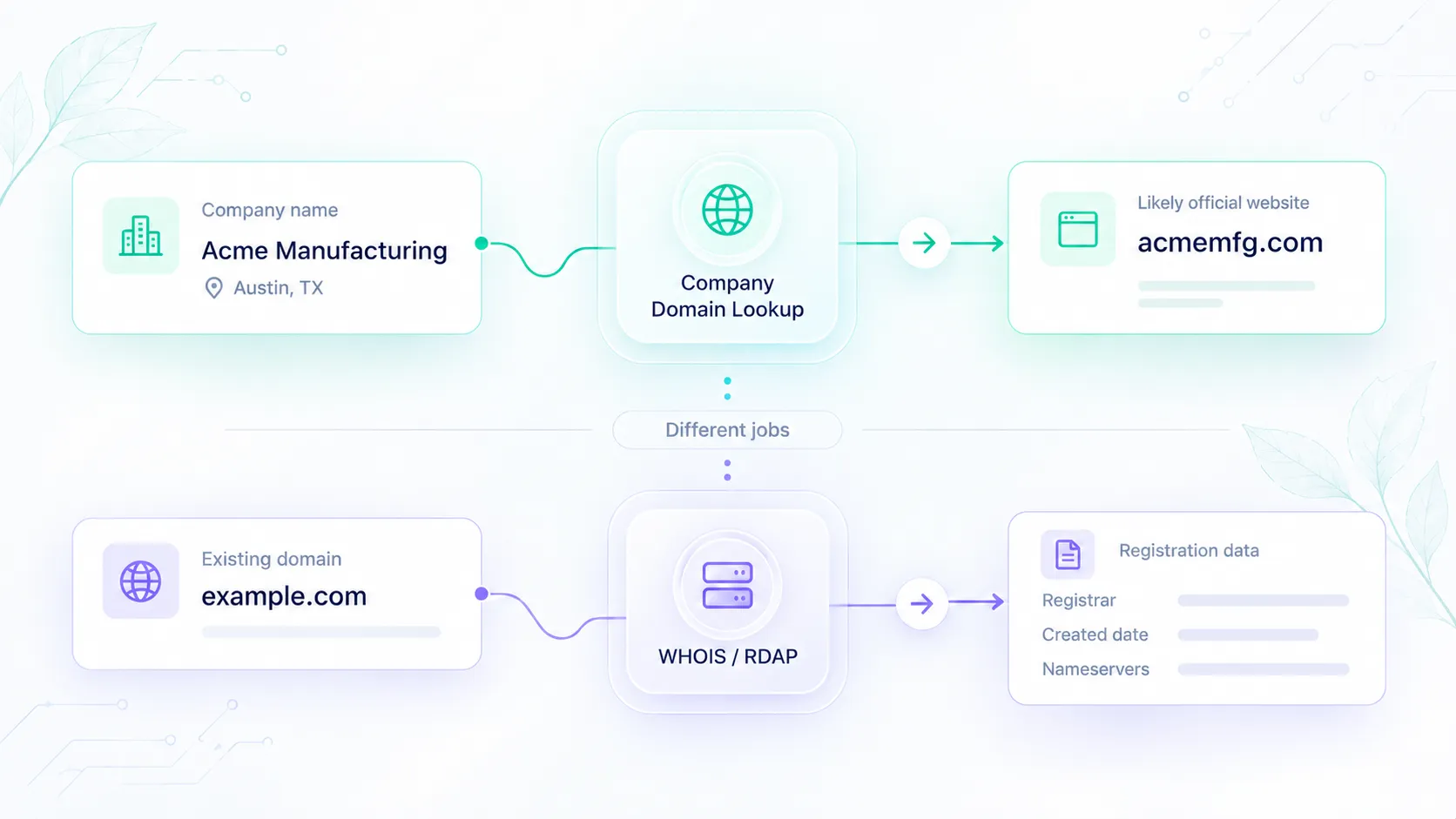
Company Domain Lookup resolves a company name to a likely official website. It is not WHOIS, domain availability, or email finding. Use this boundary when you wire CRM and enrichment.
 S
S
Sora
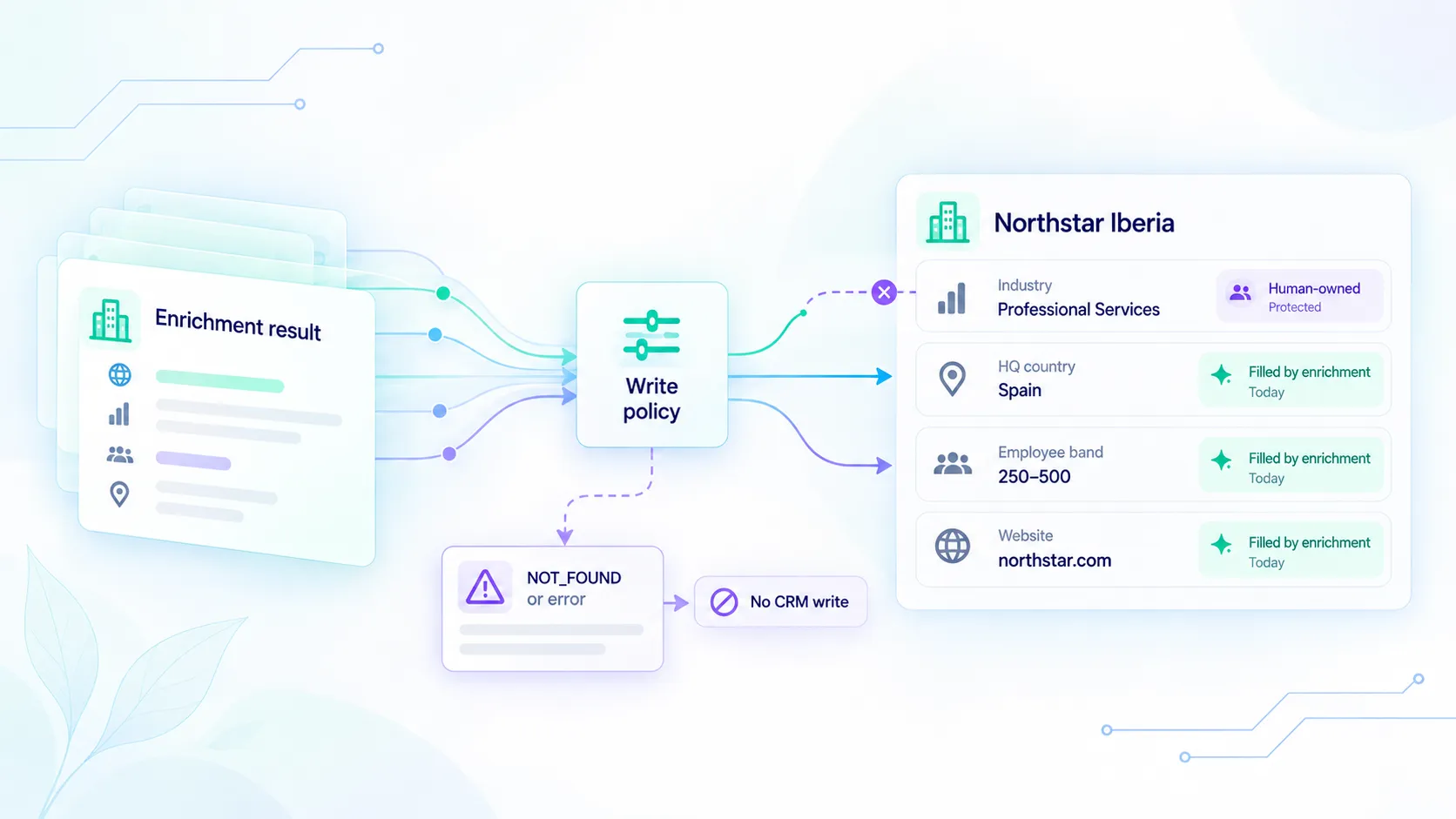
Use Elvesora Enrichment list.completed webhooks without overwriting owner-edited company fields. Treat NOT_FOUND and nulls as unknown, verify HMAC, and keep provenance on every write.
S
Sora
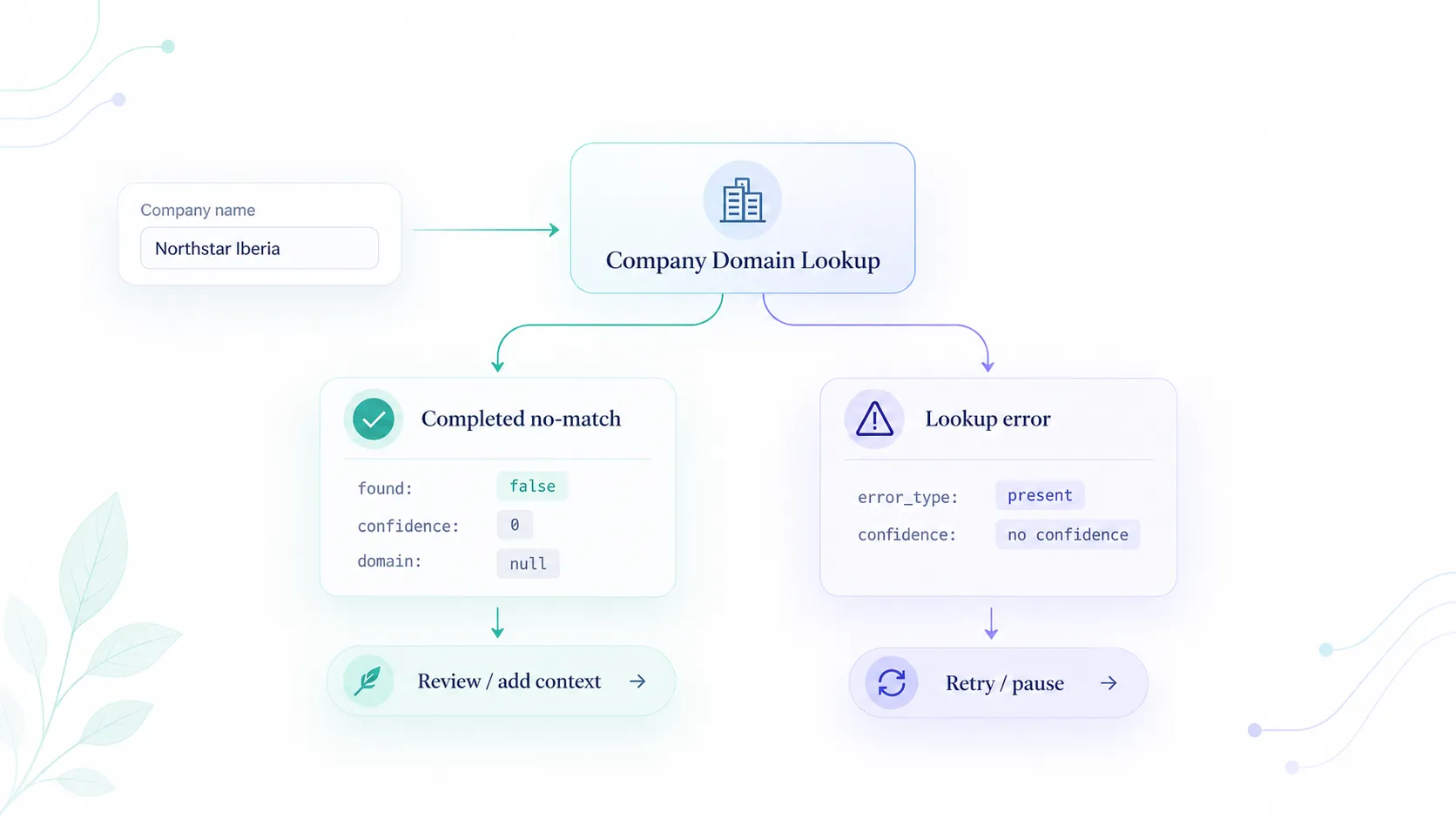
A completed no-match returns found false and confidence 0. Lookup errors omit confidence. Route write, skip, and retry from those states so CRM does not store outages as missing companies.
S
Sora