Bulk Email Validation API: Jobs, Retries, and Reason Codes
Run Soryxa batch validation as a job: 10,000-row limit, retry only unvalidated rows, export the eight CSV columns, and treat SERVICE_UNAVAILABLE as fallback review rather than a bounce.

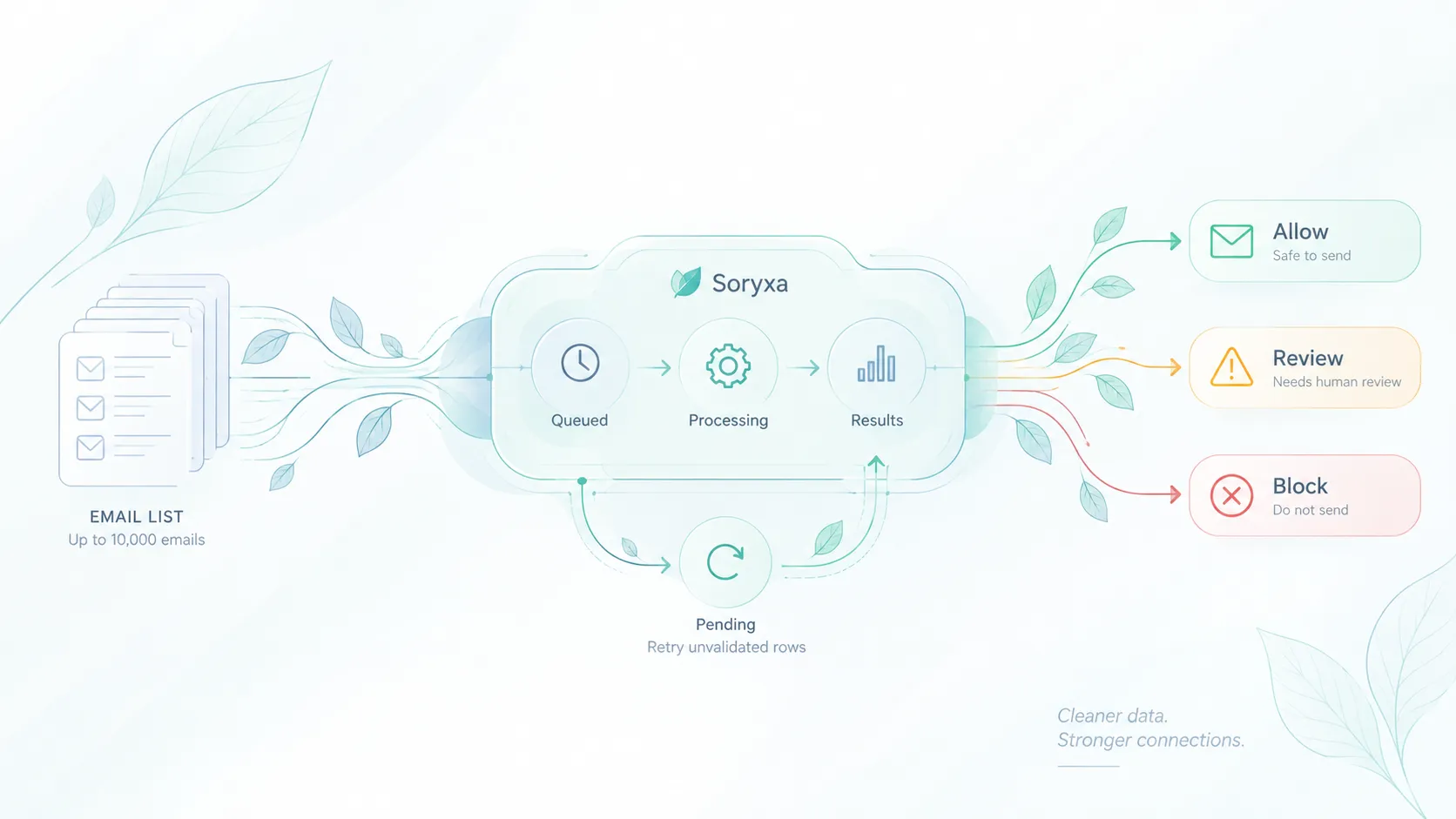
A bulk email validation API is a job, not a for-loop around the real-time endpoint.
Soryxa batch jobs use the same allow / block / review model as single-email validation, but add job state, credit tracking, exports, and explicit retry boundaries.
This article covers the operational contract for list runs: job states, limits, exports, retries, policy re-runs, and reason codes. For bounce-risk policy and workflow design, see Reduce email bounce risk.
Create and watch the job
Batch API (see batch validation docs):
POST /api/v1/batch— JSONemailsarray, optional nameGET /api/v1/batch— list jobsGET /api/v1/batch/{id}— status and countsGET /api/v1/batch/{id}/results— decision, reason code, score, checksGET /api/v1/batch/{id}/export— CSVGET /api/v1/batch/{id}/credits— reserved vs consumedPOST /api/v1/batch/{id}/cancel
The batch limit is 10,000 emails per job. Batch creation reserves one credit per submitted row. If Soryxa cannot reserve enough credits, the API returns HTTP 429 with INSUFFICIENT_CREDITS; the batch is not created or queued.
These seven routes are the public, token-authenticated batch API. Retry unvalidated rows, policy re-runs, delta exports, and scheduled list hygiene are dashboard operations. If an API-only integration needs to check an address again later, submit it in a new batch.
Treat the batch ID as the durable reference for the run. Store the API's id, created_at, status, row counts, and credit_summary. Keep your own source identifier and export timestamp separately. For each result, store row_number, row status, decision, and reason_code, plus score and error_message when present. Preserve rerun_delta lineage when the response contains it.
A normal run moves from queued to running and then to a terminal state. Do not assume that every terminal batch contains a decision for every submitted row.
Statuses you will see: queued, running, completed, incompleted, cancelled, and failed.
UI uploads accept CSV, TXT, or XLSX with the same decision model.
CSV export vs results API
The export CSV has eight columns:
row_number, email, status, decision, reason_code, decision_message, score, error_message
It does not include checks or decision_reasons. Read those from the results endpoint if you need them.
Do not fail a pipeline because the CSV is "missing" fields that were never in the export contract.
Use CSV for operational handoff and the results API when downstream logic needs the full validation evidence.
Retry only unvalidated rows
Retry unvalidated rows requeues pending rows after a partial batch. It does not revalidate completed allow, block, or review rows.
That matters for credits and for stability:
- A completed
blockwithCLASSIFICATION_INVALIDstays a block. - A completed
reviewwithCLASSIFICATION_RISKYstays in review; pending-row retry will not select it. SERVICE_UNAVAILABLEis a completed review fallback, not proof the mailbox is bad. It is not part of Retry unvalidated rows. Keep it in review or fallback handling; to check the address again, submit it in a later validation run.
Usage limit: pause new batches, check credits, then retry. Do not hammer the real-time API as a workaround.
Policy re-run and list hygiene
A policy re-run creates a new batch from retained reusable email addresses and records rerun lineage plus available source and target policy revision metadata. It sends those addresses through the normal validation path again. That path may use a current cached result, so a re-run is not a replay of only the previous batch's stored evidence and does not guarantee newly collected evidence for every row.
For example, after changing how the active policy handles role accounts, queue a policy re-run to compare the new batch's decisions with the previous batch.
A delta export compares previous and current decisions, reason codes, changed flags, and changed-risk contacts.
Soryxa supports weekly, monthly, and quarterly list-hygiene schedules. Each scheduled run creates a new validation batch. Track changed-risk contacts between runs instead of assuming the first decision is eternal.
None of these should silently flip allow to block in CRM without storing the new reason_code.
| Situation | Action | Which rows are processed? |
|---|---|---|
| Partial batch left pending rows | Retry unvalidated rows | Pending rows in the same batch only |
Completed SERVICE_UNAVAILABLE review |
Review it or submit a later validation run | Not included in pending-row retry |
| Policy changed | Policy re-run in the dashboard | Retained reusable addresses in a new batch |
| Scheduled hygiene check | Scheduled hygiene in the dashboard | Retained reusable addresses in a new batch |
Retry recovers unfinished work. A policy re-run creates a new validation batch after a policy change. Scheduled hygiene creates a new batch on the configured cadence. Do not treat them as the same operation.
Reason codes in bulk
Store decision + reason_code per row.
Two rows can both return block for different reasons. CLASSIFICATION_INVALID reflects an invalid classification, while BLOCK_DISPOSABLE reflects a team policy rule applied to validation evidence for a disposable address. If you persist only block, you lose that distinction.
Useful bulk groups:
- Invalid classification vs team policy blocks (
BLOCK_DISPOSABLE,BLOCK_ROLE_ACCOUNT, and similar) - Review volume (
CLASSIFICATION_RISKY,SCORE_BELOW_THRESHOLD) - Service fallback (
SERVICE_UNAVAILABLE)
If review volume is high, inspect rule thresholds before you change automation. Docs: reason codes and rules and review queue.
Implementation checklist
- Treat every bulk run as a job with its own ID and state.
- Keep batches within the documented size limit.
- Store
decisionandreason_codefor every completed row. - Use the results API when downstream logic needs checks beyond the CSV contract.
- Retry unfinished work without revalidating completed rows.
- Keep retry, policy re-run, and scheduled hygiene as separate operations.
- Do not model retry, policy re-run, delta export, or scheduled hygiene as public batch API endpoints; they are dashboard operations.
- Preserve
rerun_deltasource and target policy revision IDs when present. - Treat
SERVICE_UNAVAILABLEas a completed review fallback, not evidence that an address is invalid.
A reliable bulk-validation integration does not simply process every address eventually. It preserves which work completed, which work may be retried, and why each completed row received its decision.
For the product overview and current plans, see the Soryxa email validation API and Soryxa pricing.