Explorium AgentSource Is Shutting Down: Where to Move Your Company Data Workflows
Explorium is discontinuing AgentSource on 2 December 2026. See the dates from its notice, what to export first, and where to move company enrichment and domain lookup for your AI agents.

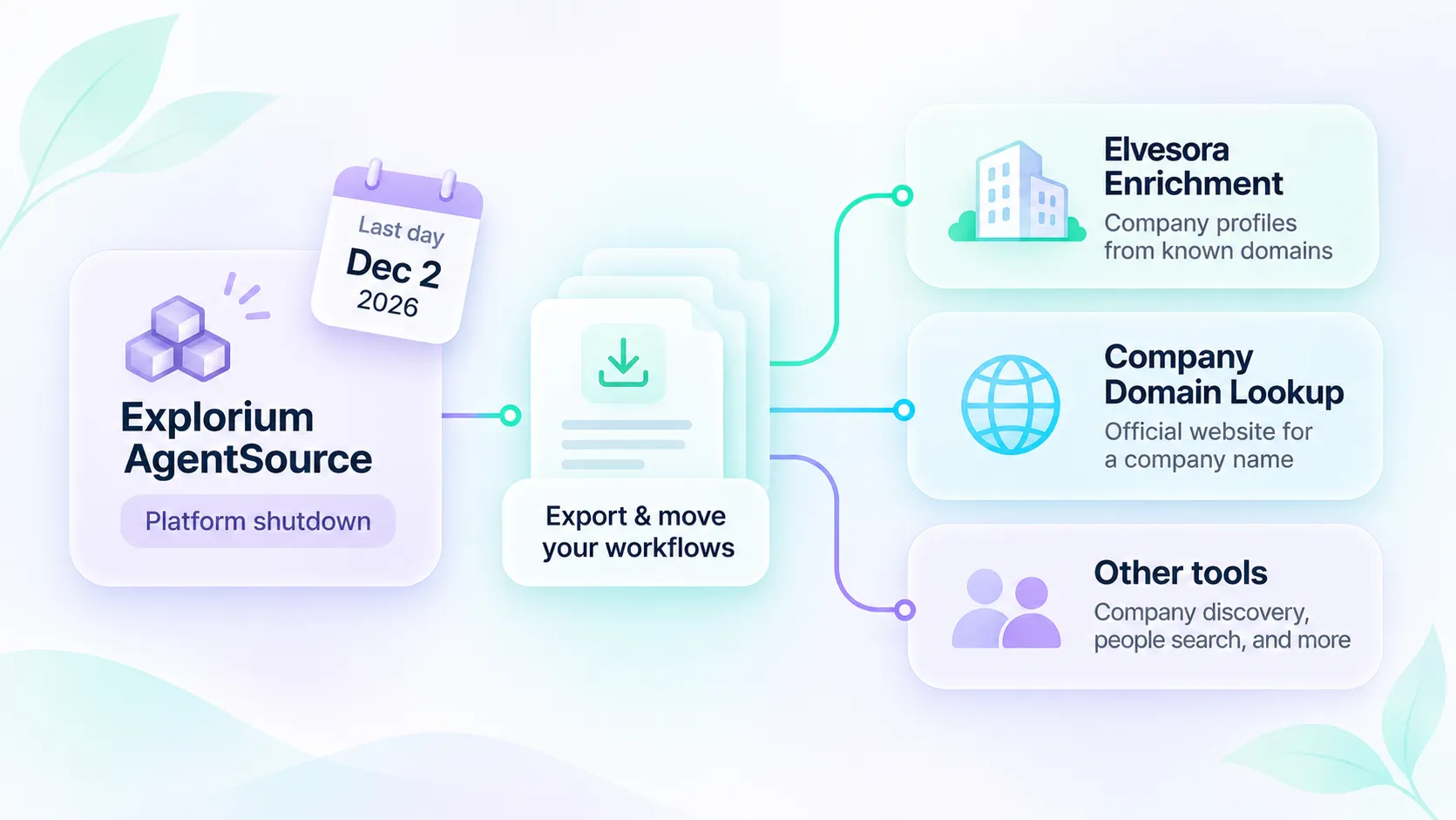
Explorium announced on 3 November 2026 that it is ceasing operations and discontinuing its AgentSource platform. If an AI agent, a sales workflow, or an internal tool of yours calls AgentSource for company data, you have a short window to export what you need and move each task to another provider.
This guide covers Explorium's shutdown timeline, what to export before the deadline, and how to move different AgentSource tasks. For company-level workflows, Elvesora Enrichment handles profiles from known domains, while Company Domain Lookup helps resolve company names to likely official websites. Neither product replaces AgentSource's people-search or company-discovery capabilities.
Disclosure: Elvesora publishes this article and operates Elvesora Enrichment and Company Domain Lookup. The Explorium dates below come from Explorium's own shutdown notice and farewell post, both dated 3 November 2026 and read on 16 November 2026. This is not a benchmark and not a claim of equal coverage: Explorium offered business and contact data, while Elvesora returns company-level data only.
What Explorium announced
The notice from Explorium's founders sets these dates:
| Date | What the notice says |
|---|---|
| 3 November 2026 | Explorium announces that it is shutting down operations. Automated billing stops on this date. |
| 2 December 2026 | Last day the AgentSource platform is available. Remaining credits can be used until then. Data exports are available until this date only. |
| Within 30 days after 2 December 2026 | Credits still unused on 2 December are refunded to the original payment method. |
| No later than 31 December 2026 | Customer data and account information are deleted. Only limited billing records required by law are kept. |
The notice names the AgentSource platform. It does not name a successor, an acquirer, or a recommended replacement. If you reach Explorium data through another path, confirm its status with Explorium directly instead of assuming it continues.
What to do before 2 December 2026
- Export your data. Exports end on 2 December. Download saved lists, enrichment results, and anything a report or a CRM sync depends on.
- List every call your agents make. For each one, write down the input (a domain, a company name, a person, a search filter), the fields you actually use, and where the result is written.
- Split the calls by task. Company profile, company identity, company search, and contact search are different jobs. They rarely move to one provider.
- Keep the billing email. Explorium asks for the email address linked to the AgentSource account when you contact its team, and the refund goes to the original payment method.
- Remove the old connection after the cutover. Delete the AgentSource MCP server from your client configuration and remove its API key from your secrets store, so an agent does not keep calling a server that no longer answers.
Where each task can go
| Task in your workflow | Where to move it |
|---|---|
| Company profile from a known domain | Elvesora Enrichment: the MCP tool enrich_company or the REST API |
| Official website for a company name | Elvesora Company Domain Lookup: the MCP tool resolve_company_domain or the REST API |
| A file of domains to enrich | Elvesora Enrichment lists: upload CSV, XLS, or XLSX |
| Searching for companies by filters, or finding similar companies | A company-search provider. Elvesora enriches a domain you already have; it is not a company search engine. |
| Finding people, personal emails, or phone numbers | A people-data provider such as Apollo. Elvesora does not return person profiles. |
If most of your AgentSource calls were company research for accounts you already know, the first two rows cover them. If most were prospect-list building, treat Elvesora as the company-data step next to a contact provider.
Why Elvesora for the company-data step
Elvesora Enrichment accepts a business domain and returns one company profile:
- Firmographics: industry, employee count, headquarters, founding year, revenue range, and public company links when available.
- Dated observations: headcount history, reported revenue by fiscal year, funding rounds and yearly funding summaries, and job postings on the company's official job board, each with its date and qualifier.
- Context: operating brands, technology labels grouped by category, competitors, and public company-level contact channels.
- A clear outcome: every answer carries a
result_typesuch asENRICHED,NOT_FOUND, orPENDING, so an agent can tell a profile from a missing result. A null section means that information is not currently available in the returned profile. Research may still be unfinished, so do not treat null as proof that no relevant data exists.
The credit rules are short. Only an ENRICHED result uses one credit. NOT_FOUND and PENDING use none. Repeating the same domain through the same MCP connection within 24 hours can replay a cached successful result without another credit. A top-level PENDING result is not a completed company profile.
Pricing is self-serve. The Free plan includes 100 enriched companies a month, and paid plans start at $30 a month for 1,000 companies. See Enrichment pricing.
Company Domain Lookup is the separate step for a company name. It returns the suggested official website with a confidence score, the reasons, and a review_recommended flag, or a clear no-match. The Free plan includes 10 lookups a month, and paid plans start at $40 a month for 1,000 lookups. See Domain Lookup pricing.
How to reconnect your agent
Both products have a remote MCP server and a REST API. The MCP servers accept Elvesora sign-in (OAuth) or a team API token sent as a bearer header.
| Product | MCP server URL | Tool |
|---|---|---|
| Enrichment | https://enrichment.elvesora.com/api/mcp/enrichment |
enrich_company |
| Company Domain Lookup | https://prospecting.elvesora.com/api/mcp/domain-lookup |
resolve_company_domain |
In Claude Code, the token option for Enrichment is one command. Set ELVESORA_ENRICHMENT_TOKEN in your shell environment before running the command. Keep the token in a secure credential store rather than hardcoding it. Create the token in Enrichment under Integrations, then API:
claude mcp add --transport http elvesora-enrichment \
  https://enrichment.elvesora.com/api/mcp/enrichment \
  --header "Authorization: Bearer ${ELVESORA_ENRICHMENT_TOKEN}"
Then ask the agent for one company with a domain you already trust:
Enrich stripe.com once. If the result is ENRICHED, summarize the industry, employee count, and headquarters country, then any headcount history, reported revenue, funding, and job postings with their dates. List null sections as unknown. For any other result, report result_type and stop.
If your application runs the tools itself, call REST instead:
curl --request POST \
  'https://enrichment.elvesora.com/api/v1/enrichment/company' \
  --header "Authorization: Bearer ${ELVESORA_ENRICHMENT_TOKEN}" \
  --header 'Idempotency-Key: account-42-profile-v1' \
  --header 'Content-Type: application/json' \
  --header 'Accept: application/json' \
  --data '{"domain":"stripe.com"}'
When the agent starts with a company name, connect Company Domain Lookup as well. The rule both servers give the agent is simple: enrich a found domain only when review_recommended is false. When it is true, the agent shows the candidate and asks you to confirm the company first. Each product uses its own connection, token, and credits.
Setup for other clients is in the Enrichment documentation and the Domain Lookup documentation.
Move one workflow first
- Pick the workflow with the most calls and a known-domain input.
- Run 20 to 50 of your own accounts through the Free plan and compare the fields you actually use.
- Map the fields. In REST the company fields are under
data; in the MCP result they are undercompany. - Add handling for
NOT_FOUND,PENDING, andLIMIT_EXCEEDEDbefore you allow any write to a CRM. - Switch the agent's prompt and tool list, then remove the AgentSource connection.
What Elvesora does not replace
Elvesora returns company-level data. It does not find individual people, personal emails, or direct phone numbers, it does not identify website visitors, and it does not search for companies by filters. If your AgentSource workflow depended on those, keep that part with a provider built for it and use Elvesora for the company profile.