How to Handle Ambiguous Company Names in Domain Matching

Ambiguous company names can create plausible but unsafe domain matches. Learn how to set confidence thresholds, review states, source-specific policies, and audit fields before domain matches update CRM, enrichment, routing, or reporting workflows.

Sora

Sora

Digital Guide

How to Handle Ambiguous Company Names in Domain Matching

Stay in the loop

Get practical notes on company domain lookup, Elvesora Enrichment, Soryxa email validation, and CRM data quality.

No spam, unsubscribe anytime.

Quick Insight

Read time
15 min
Views
47
Published
May 12, 2026

Introduction

Ambiguous company names usually don’t fail immediately. A lookup may return a plausible domain, but that does not automatically make the match safe for the workflow that follows.

A short brand name may belong to several unrelated companies. Sometimes a local business shares a name with a much larger global brand. In other cases, the submitted record is simply missing context. A legal suffix may be missing from the submitted record. A regional office may use a domain that differs from the parent company. A company may rebrand while older invoices, CRM records, and data imports still use the previous name.

The risk is not just that a domain lookup returns nothing. The bigger risk is that automation treats a weak or context-light result as final and then pushes that decision into company data enrichment, CRM cleanup, routing, reporting, or account standardization workflows.

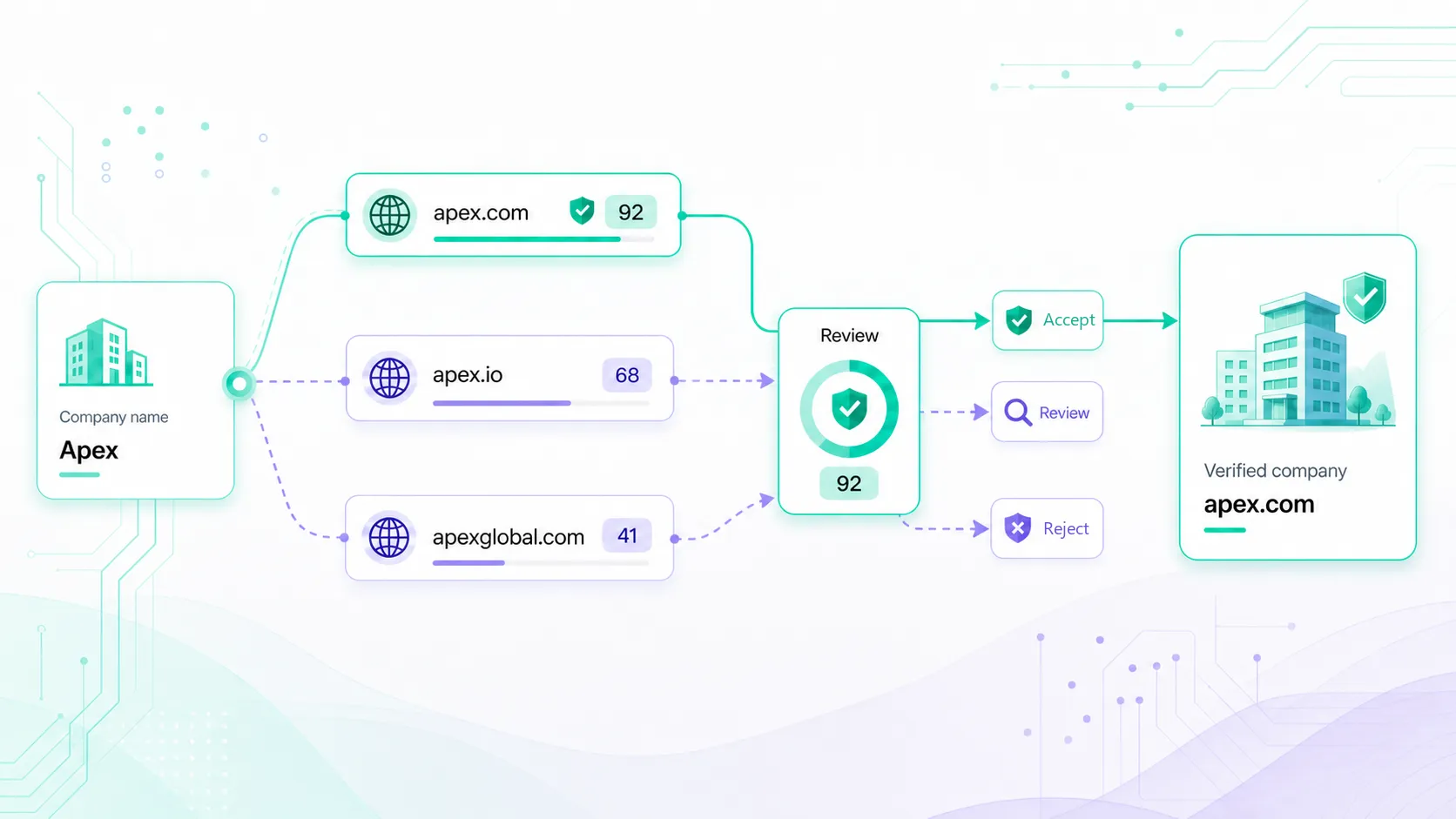
Company domain lookup does not need to become manual because of this. But the lookup result and the downstream action should usually be treated separately. The result can identify a likely official domain, while the policy layer decides whether to accept, review, reject, or hold that match.

This guide focuses on that policy layer: how to decide when a company name to domain match can be automated, when it should enter review, and what evidence to keep for later audit.

Quick answer: how should teams handle ambiguous company names?

There is no universal threshold that makes every company name safe to automate. The right decision depends on the action the domain match will trigger.

If you are designing ambiguous company name domain matching, start with three questions:

  • What will happen if the selected domain is wrong?
  • Does the lookup result include a confidence score, live-domain status, and explainable match reason?
  • Should this action run automatically, move to review, or stop until a stronger signal is available?
Match state Recommended handling Safe for Not safe for
High confidence with clear explanation Use automatically for low-risk workflows and log the match details. Staging updates, enrichment preparation, dedupe suggestions, low-risk field completion. Permanent merges without an audit trail or policy approval.
Medium confidence or partial context Store the result with a review status and show the explanation to an operator. Review queues, CRM hygiene tasks, routing fallback decisions. Overwriting canonical domains or assigning high-value accounts automatically.
Low confidence or conflicting signals Do not use the result as a final match. Keep the submitted name and request more context. No-match reporting, manual research, source-data cleanup. CRM merges, ownership assignment, account scoring, or reporting key updates.

In practice, most teams end up with a model like this:

  • Use automatic matching when confidence is high, the explanation is clear, and the downstream action is low risk.
  • Use review states when the match is plausible but the action could change core records.
  • Reject or hold the match when signals conflict or the lookup cannot identify a likely official domain.
  • Store the original input even when a match is accepted, so operators can inspect the decision later.

Why ambiguity appears in company name to domain matching

Company names are written for people, contracts, invoices, forms, and source systems. They are not always written for automation.

A signup flow may capture a workspace name. A CSV import may include legal entities. A billing system may store parent companies, regional entities, or older names. A CRM may contain an account name that has drifted across years of manual edits.

That means ambiguity is usually source-specific. The same submitted string can be low risk in one workflow and high risk in another because the available context and downstream action are different.

Ambiguity often appears when:

  • The name is very short, such as a three-letter acronym.
  • The name is generic, such as a common industry word or local service term.
  • The legal suffix is missing, inconsistent, or outdated.
  • A subsidiary, regional office, or parent company could all be valid candidates.
  • The company recently rebranded but older records still use the previous name.
  • The submitted name is a product, workspace, publication, or event rather than the company itself.

A domain lookup result should therefore be judged by confidence, explanation, source context, and action risk. The question is not only whether a domain was returned. The question is whether that domain is strong enough for the specific change the system is about to make.

First: separate lookup from action

One of the most common mistakes is treating a returned domain as a final decision.

A lookup can return the most likely official domain, confidence score, live-domain status, and match explanation. The action layer decides what to do with that result.

That separation matters because the cost of a weak match depends on the workflow. Updating a temporary staging table is low risk. Merging CRM accounts is high risk. Assigning ownership for an inbound account may sit somewhere in the middle, depending on deal value and routing rules.

A safer design treats company domain lookup as an identity signal. It can support automation, but it should not automatically overwrite core data unless the match quality and workflow risk both support that action.

Build thresholds before automation

A clear threshold model keeps ambiguous company name domain matching from becoming a hidden source of bad data.

The exact thresholds should reflect your workflow, but the structure should be defined before automation runs.

Action Suggested threshold posture Reason
Populate a missing website field in a staging record Moderate to high confidence may be acceptable. The result can be reviewed or corrected before it becomes canonical.
Prepare company data enrichment High confidence is preferred; medium confidence can enter review. The selected domain controls which company profile gets enriched.
Flag possible duplicate CRM accounts Medium confidence may be useful as a suggestion. The workflow recommends review rather than merging automatically.
Overwrite a canonical company domain High confidence plus review or a strict policy gate. A wrong canonical domain can affect many downstream systems.
Merge CRM accounts High confidence plus human review. Merges are difficult to reverse and can distort account history.
Assign ownership or territory High confidence plus clear explanation, or a fallback queue. Routing errors create manual rework and inconsistent follow-up.

The important rule is that confidence is not interpreted in isolation. It is interpreted against the action that follows.

If every script, controller, and operator interprets scores differently, confidence scoring becomes decorative instead of operational.

Use context to reduce ambiguity

Company name alone is often not enough. Additional context can make company domain matching safer, especially when the submitted name is short or shared by multiple organizations.

Helpful context can include:

  • Country or region from the submitted record.
  • Existing website fields already stored in CRM.
  • Email domain from the submitter or account owner.
  • Known account domains from previous records.
  • Industry, company size, or source system metadata.
  • Live-domain status and whether the domain appears active.
  • Match reasons that explain why the domain was selected.

Context should improve the decision without turning the workflow into an unexplainable rule stack.

If a workflow selects a domain because the submitted country, known account domain, and live-domain check all support the same result, operators should be able to see that reasoning. If the result was chosen only because the name was similar, that should also be visible.

For example, a submitted company name like “Northstar” may be impossible to resolve confidently on its own. But if the workflow also includes a Canadian billing address and an existing employee email domain, the match becomes much safer to automate.

Teams are much more likely to trust automation when they can understand why a domain was selected.

Set review states before you need them

Ambiguous matches should not collapse into a single success or failure state.

A practical workflow usually needs at least four states:

  • Accepted: The match meets the policy for the action that will use it.
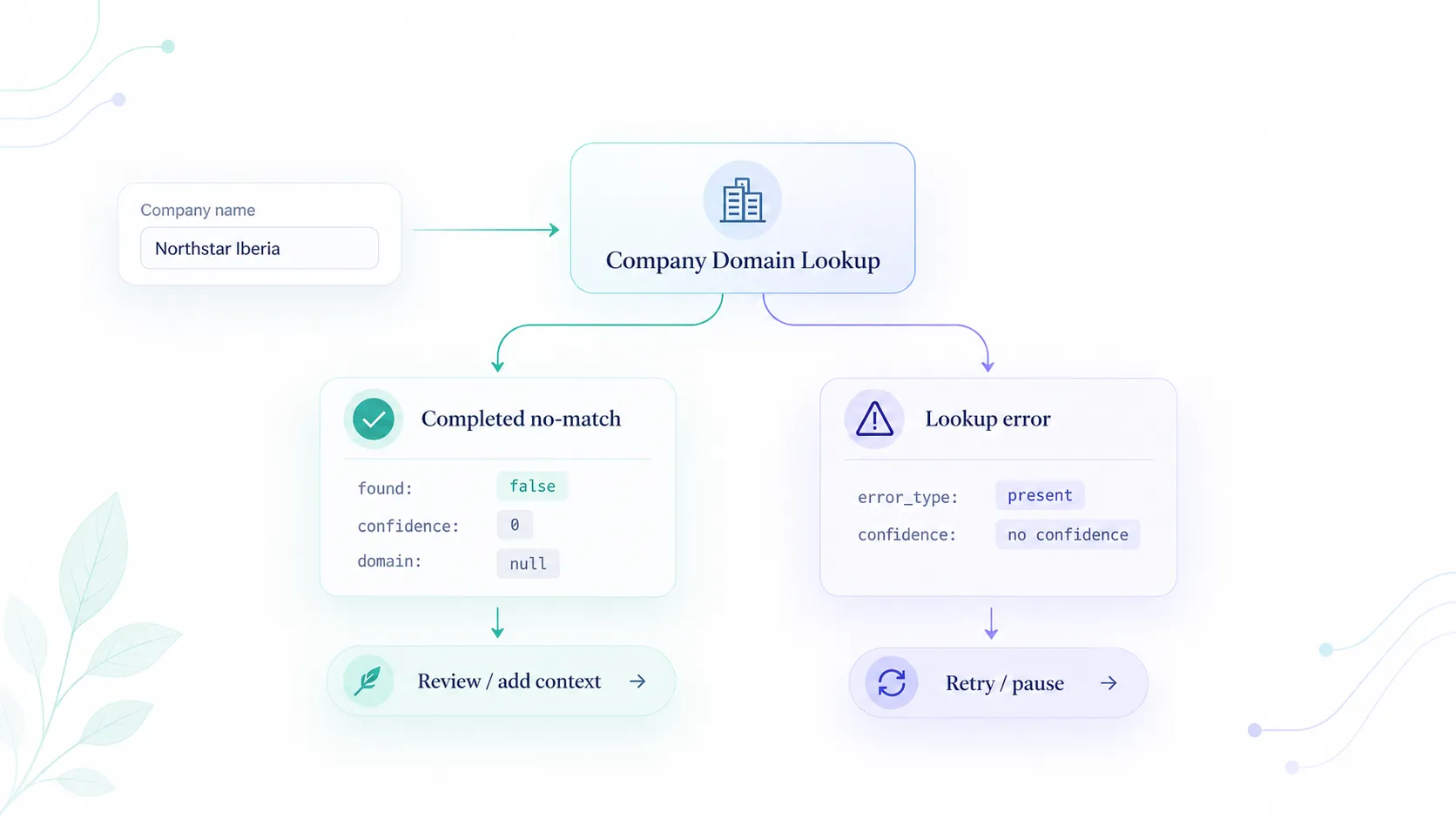
  • Needs review: The match is plausible, but confidence or context is not strong enough for automatic use.
  • Rejected: A reviewer or policy rule determined that the candidate domain should not be used.
  • No match: The lookup did not produce a candidate strong enough to store as a selected domain.

For long-running CRM or enrichment workflows, a fifth state can help:

  • Superseded: A later lookup or reviewer decision replaced the earlier result.

These states matter because they keep weak matches out of production automation without hiding useful evidence. A needs-review result can still help an operator move faster. A no-match result can still reveal that a source system is missing important context.

What to store with every domain match

A company domain lookup result is more useful when it creates an audit trail.

At minimum, store:

  • Original submitted company name.
  • Normalized company name, if available.
  • Candidate or selected official domain.
  • Confidence score.
  • Live-domain status.
  • Match explanation or reason codes.
  • Review status, such as accepted, needs review, rejected, or no match.
  • Source system and timestamp.
  • Downstream action that the result is allowed to support.

For higher-risk workflows, also store candidate domains, reviewer notes, and the reason a reviewer accepted or rejected the selected domain.

A simple internal record for an ambiguous case can look like this:

{
  "submitted_company_name": "Northstar",
  "candidate_domain": "northstar-example.com",
  "selected_domain": null,
  "confidence_score": 67,
  "live_domain": true,
  "match_status": "candidate",
  "review_status": "needs_review",
  "source_system": "crm_import",
  "allowed_actions": ["dedupe_suggestion"],
  "blocked_actions": ["canonical_domain_update", "account_merge"],
  "match_reasons": [
    "name_alignment",
    "live_domain",
    "missing_region_context"
  ]
}

Use fictional examples like this for editorial clarity unless a real customer or public source has been approved.

The important detail is that the uncertain match is still useful, but it is not treated as final. Automation can use it for a low-risk suggestion while preventing it from overwriting canonical CRM data.

Avoid overfitting review rules

Context helps, but overfitting creates its own problems.

A rule that works for one source can fail in another. A signup form may have reliable email-domain context. A partner CSV may not. A CRM import may include complete legal names. A webhook may only include a workspace label.

Keep the first version of the review model simple:

  • Require stronger confidence for destructive actions.
  • Send unclear matches to review instead of forcing a result.
  • Preserve the submitted name even when a domain is selected.
  • Track why a match was accepted or rejected.
  • Revisit thresholds after reviewing real false positives and false negatives.

This keeps the workflow practical. The team can improve decision rules from observed cases instead of guessing every exception upfront.

Use source-specific policies

One threshold model rarely fits every input source.

A signup form, partner import, CRM cleanup job, and manual research queue can all submit company names, but they do not carry the same supporting evidence.

Source Typical context Policy posture
Signup or inbound form Email domain, submitted company name, country or region, timestamp. Use high-confidence matches for routing support; send unclear results to review before ownership changes.
Partner or event CSV Company names may be abbreviated, stale, or copied from badges and forms. Prefer staging updates and review queues before enrichment or CRM writes.
CRM cleanup job Existing account IDs, historical domains, owner data, and duplicate records. Use matches as dedupe evidence, but require stricter gates before canonical updates or merges.
Manual research queue Reviewer context, notes, and candidate domains. Let operators accept or reject candidates and preserve the reason for later audit.

This source-specific view keeps the article's core rule practical: confidence is not a universal permission slip. It becomes useful when it is interpreted against context and action risk.

Recommended workflow for ambiguous matches

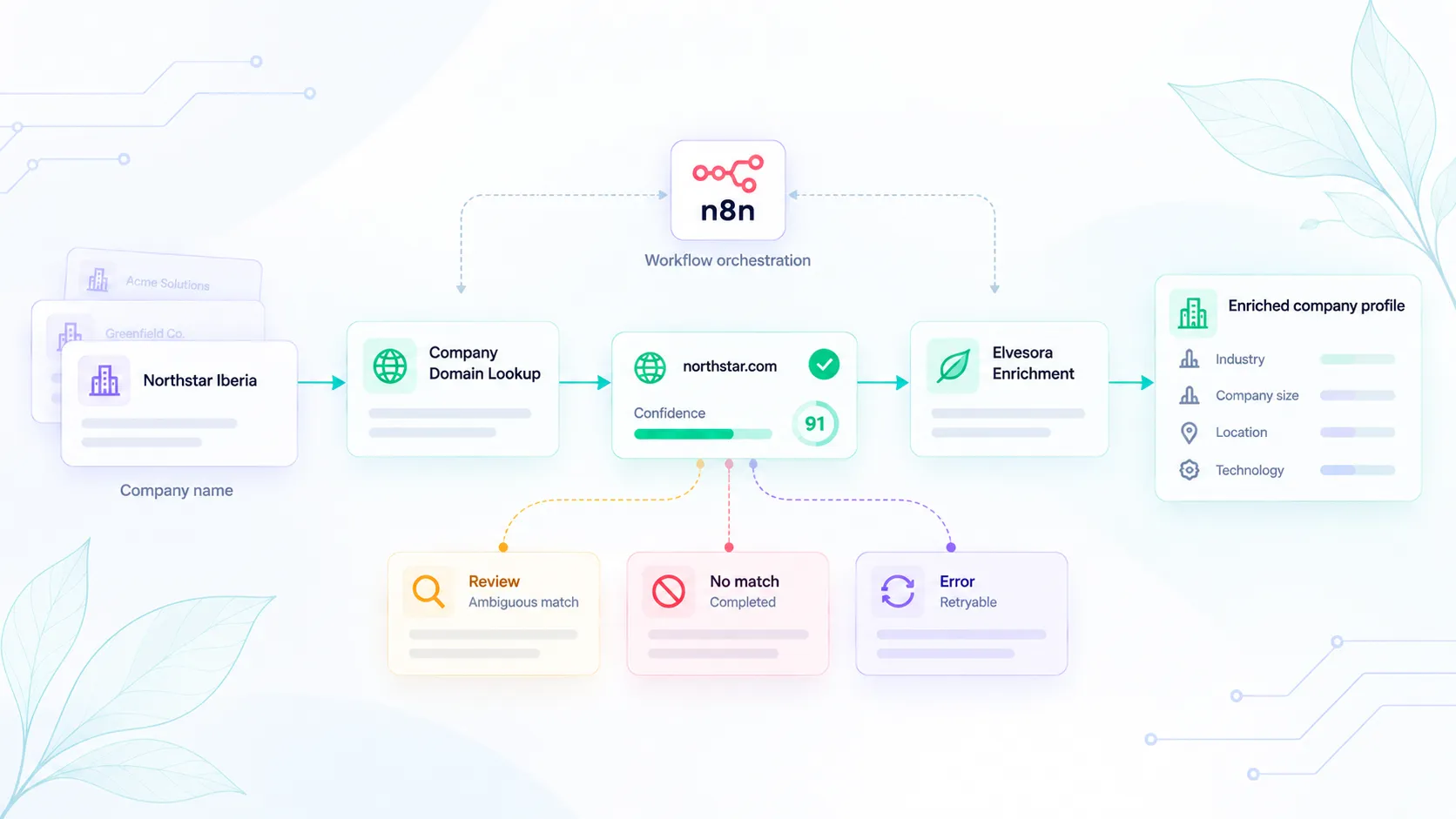
A safer workflow usually follows this sequence:

  1. Capture the submitted company name, source system, and available context.
  2. Define the downstream action before using the result.
  3. Run company domain lookup to identify the most likely official domain.
  4. Review the confidence score, live-domain status, and match explanation.
  5. Apply the source-specific and action-specific policy.
  6. Map the result to accepted, needs review, rejected, or no match.
  7. Let automation consume accepted matches only for the actions they are approved to support.
  8. Send medium-confidence, conflicting, or high-impact cases to review.
  9. Preserve the original input, candidate domain, decision, and explanation for auditability.

This pattern prevents weak matches from silently becoming system truth.

It also keeps the user experience practical. Operators do not need to review every lookup result. They only review the cases where ambiguity changes the risk of the next action.

What Elvesora Prospecting adds

Elvesora Prospecting / Company Domain Lookup is designed for company name to official domain lookup workflows where the result needs to be explainable before it is automated.

A lookup can return the most likely official domain with confidence scoring, live-domain status, and explainable match reasons. Those signals help teams decide whether the result is safe for automation, better suited for review, or too weak to use in downstream workflows.

That makes Company Domain Lookup useful before company data enrichment, CRM cleanup, lead routing, and account standardization. The lookup does not replace operational rules. It gives those rules better company identity signals to work with.

Signal How it helps ambiguity handling
Likely official domain Provides a candidate domain for downstream workflows.
Confidence score Supports threshold-based automation and review routing.
Live-domain status Helps avoid using stale or inactive domains as current company identifiers.
Explainable reasoning Shows why a domain was selected so operators can review uncertain cases faster.

For implementation details, explore Company Domain Lookup or View Domain Lookup Pricing. If you are designing ownership or territory rules around company identity, see how lead routing workflows use verified company and email signals before assignment.

When not to automate a domain match

Do not automate the domain match when the result would make a high-impact change and the signal is unclear.

Examples include:

  • Multiple candidate domains look plausible.
  • The submitted company name is a generic term.
  • The domain is inactive or does not align with the submitted context.
  • The match explanation is weak or based only on name similarity.
  • The action would merge records, overwrite canonical data, or change ownership.

In those cases, the safest result is not failure. It is a review state that preserves the candidate domain, the original name, and the explanation.

Use this guide after the basic lookup workflow is clear

Company Domain Lookup should usually run before workflows that depend on a stable company identity.

That includes company data enrichment, CRM hygiene, routing, dedupe, account standardization, and reporting cleanup. A domain match gives those systems a stronger identifier than a messy name string, but only if weak matches are handled carefully.

Use this guide when the team already understands company domain lookup and needs a policy for uncertain results. For broader risk context, read The Cost of Incorrect Company Identification in B2B Prospecting. For the product walkthrough, read How to Find a Company's Domain by Name with Elvesora.

Final recommendation

Ambiguous company names are not edge cases. They are a normal part of B2B data workflows.

The safest approach is layered:

  • Use company domain lookup to identify the most likely official domain.
  • Use confidence thresholds to decide which matches can move automatically.
  • Use context signals to reduce ambiguity.
  • Use review states for unclear or high-risk changes.
  • Store enough detail to audit every accepted, rejected, or reviewed match.

The outcome is a more reliable foundation for enrichment, routing, CRM hygiene, and reporting.

FAQ

What is ambiguous company name domain matching?

It is the problem of matching a company name to an official domain when the submitted name could refer to more than one organization, brand, subsidiary, region, or outdated record.

Should every company domain lookup result be automated?

No. High-confidence matches may be safe for low-risk workflows, but medium-confidence or unclear matches should usually move to review before they update core records.

What signals help resolve ambiguous company names?

Useful signals include the submitted name, normalized name, country or region, known account domains, existing website fields, email-domain context, live-domain status, confidence score, and match explanation.

What should happen when a company cannot be matched confidently?

Store the original name, mark the result as no match or needs review, and avoid overwriting canonical domains, merging accounts, or triggering ownership changes until stronger evidence is available.

Is a confidence score enough by itself?

No. A confidence score is useful, but it should be interpreted with the match explanation, context signals, live-domain status, and the risk of the downstream action.

Where should Company Domain Lookup run in a workflow?

Run it before company data enrichment, dedupe, CRM cleanup, routing, or account standardization so downstream systems work from a more stable company identifier.

How is this different from a general company domain lookup workflow?

A general workflow explains how to resolve a company name to a likely official domain. This guide focuses on what happens after the lookup returns a plausible but uncertain result: thresholds, review states, audit fields, and rules that decide whether the match can be automated.

Sora

Sora

Digital Guide

Sora guides Elvesora’s voice across data, clarity, and growth. She helps teams navigate company data with a focus on accuracy and transparency.

Related solutions

Use the product and workflow pages below to connect this topic back to a concrete implementation path.

Share this article

Related Articles