Company Name-to-Domain Matching Best Practices for B2B Apps
A practical best-practices guide for B2B apps that need to preserve source company data, normalize names, apply confidence policies, and hand accepted domains into enrichment or CRM workflows.

Company Name-to-Domain Matching Best Practices for B2B Apps
B2B applications collect company names in many places: signup forms, admin screens, CSV imports, CRM syncs, webhook payloads, and support workflows. Those values look simple, but they are often not stable company identities. A submitted name may be a legal entity, a product brand, a parent company, a subsidiary, a regional office, or an abbreviation that only makes sense to the person who entered it.
Company name-to-domain matching gives the application a stronger identity signal. Instead of treating a free-text company name as final, the workflow can resolve it to a likely official domain and decide whether that result is strong enough for the next action. That next action might be enrichment, account lookup, routing, dedupe, reporting, or a manual review task.
The best practice is to treat company domain matching as a decision workflow, not a string cleanup step. The lookup result matters, but so do source context, confidence, live-domain status, match reasons, and the cost of being wrong.
Quick Answer
Use company name-to-domain matching when a workflow has a company name but does not yet have a trusted domain. Preserve the raw company name, normalize only for matching, run lookup with any useful context, and map the returned confidence to the risk of the next action.
In practice:
- Store the submitted company name exactly as received.
- Normalize a separate matching value without overwriting the source.
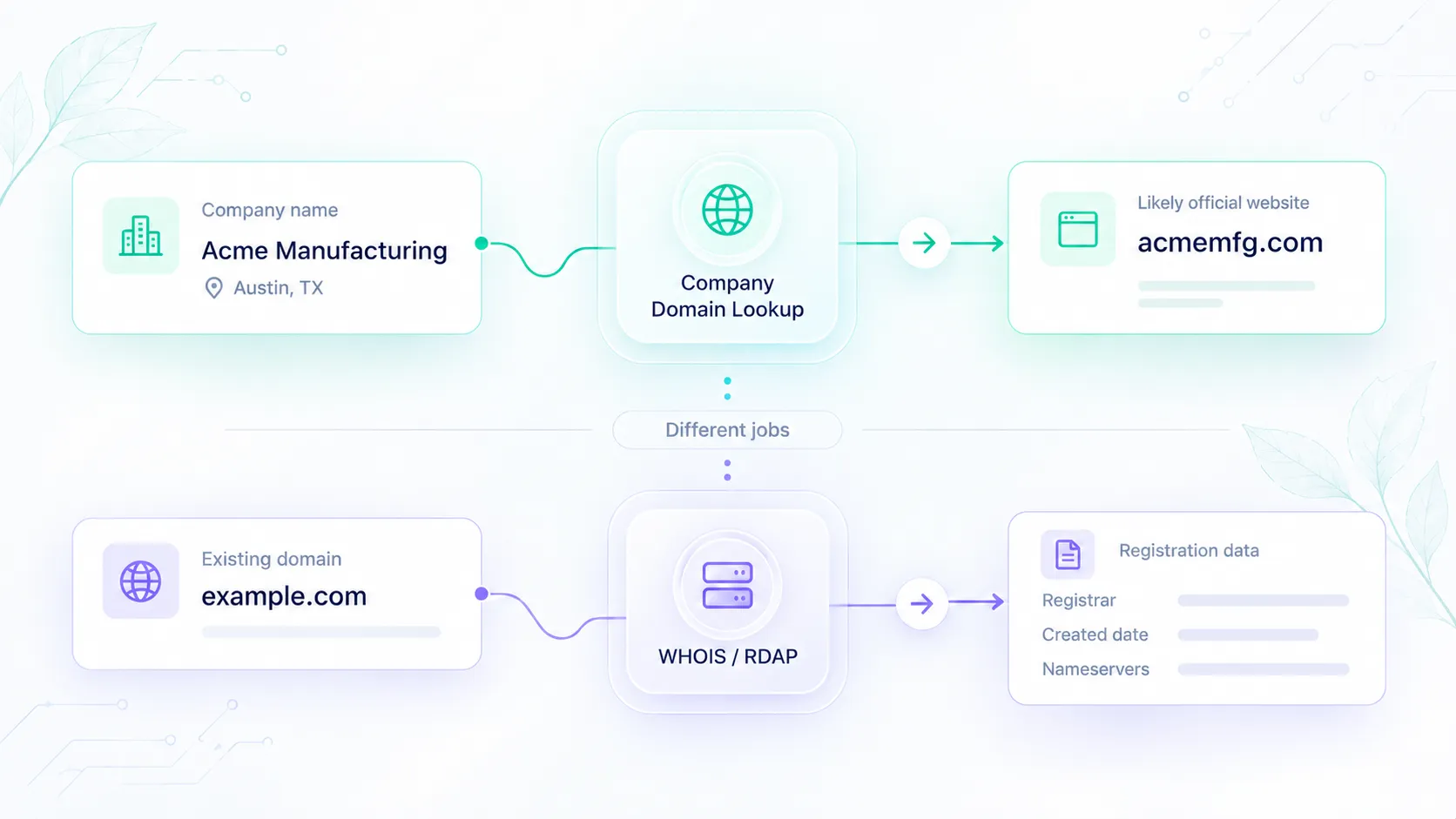
- Use Company Domain Lookup to resolve likely official domains.
- Accept high-confidence, live-domain results only for approved actions.
- Send ambiguous, medium-confidence, or conflicting results to review.
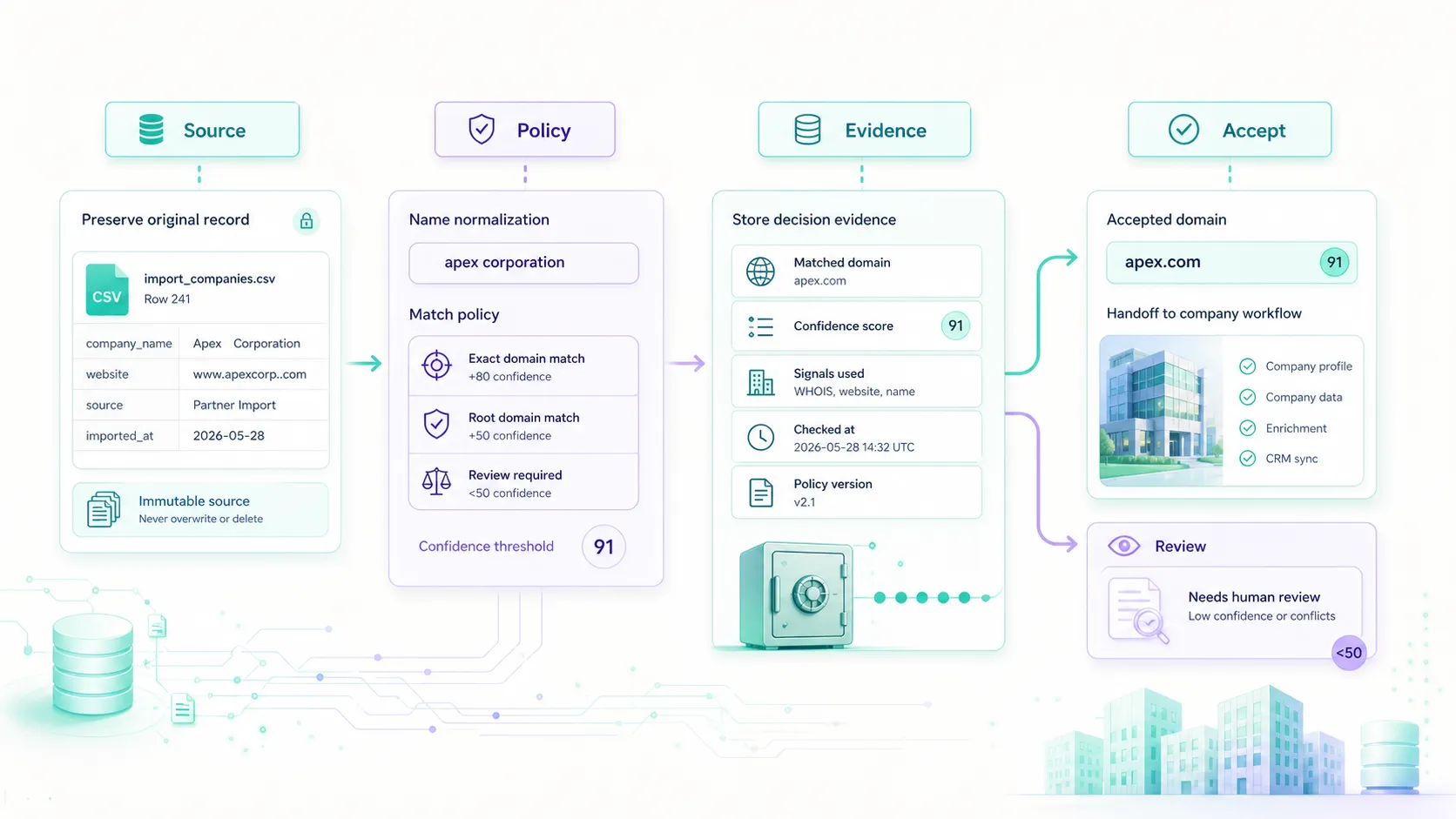
- Store the accepted domain, confidence, reason summary, source system, and decision state.
- Use accepted domains for company domain lookup workflows, CRM hygiene, or company-level enrichment only after the domain decision is clear.
This pattern keeps automation useful without allowing weak matches to become system truth.
Start With The Job The Match Must Do
Before choosing thresholds or writing API code, define what the matched domain is allowed to change. The same match can be low risk in one workflow and high risk in another.
| Workflow action | Risk level | Recommended rule |
|---|---|---|
| Store a candidate domain beside the submitted name | Low | Allow more results, but keep confidence and explanation visible. |
| Prepare company-level enrichment | Medium | Continue when confidence is strong and the domain is live; otherwise hold for review. |
| Suggest duplicate accounts | Medium | Use domain as evidence, not as the final merge decision. |
| Route an inbound account or signup | Medium to high | Require confidence, live-domain status, and consistency with source context. |
| Overwrite a canonical CRM domain | High | Require strict policy gates and review for conflicts. |
| Merge records or change ownership | High | Do not rely on a single match result without additional account context. |
This framing prevents the most common mistake: using a returned domain as permission to do everything. The result should feed a policy. It should not become the whole policy.
Preserve Source Data
Company matching should never destroy the original input. If a user enters "Acme EU" and the matching layer normalizes that to "acme", the application still needs to know what was submitted. The suffix or regional clue may be important later.
Store at least two values:
submitted_company_name, the original value from the source system.normalized_company_name, the cleaned value used for matching.
For higher-risk workflows, also store the source system, row ID, event ID, form name, import batch, account ID, or reviewer note. That data helps explain why a record was accepted, held, or corrected later.
Preserving source data also supports better troubleshooting. When a domain match looks wrong, the team can compare the submitted name, normalized name, match reason, and decision state instead of guessing what happened during import.
Normalize Without Erasing Meaning
Normalization is useful when it removes noise. It becomes risky when it removes meaning.
Safe normalization usually includes trimming spaces, collapsing repeated whitespace, lowercasing for comparison, and removing obvious punctuation that does not affect identity. More aggressive changes need care. Legal suffixes, region names, product brands, and abbreviations can change the intended company.
For example, "Acme Germany", "Acme Health", and "Acme Labs" may not be interchangeable. A normalizer that reduces all of them to "acme" creates ambiguity before lookup even starts. Keep the raw value and use additional context when the source provides it.
Useful context can include country, region, industry, submitted website, business email domain, CRM account ID, partner source, or import batch. That context should guide matching and review, not silently overwrite the original record.
Use Confidence As A Workflow Control
Confidence scores are most useful when they control what can happen next.
| Match state | Recommended handling | Safer uses | Avoid |
|---|---|---|---|
| High confidence, live domain, clear reasons | Accept for approved low-risk actions. | Enrichment preparation, account lookup, non-destructive routing support. | Irreversible merges without policy approval. |
| Medium confidence or partial context | Store the result and send higher-risk actions to review. | Review queues, import staging, duplicate suggestions. | Overwriting trusted company fields. |
| Low confidence or conflicting signals | Preserve the input and request more context. | Source-quality reporting, manual research. | Domain-dependent automation. |
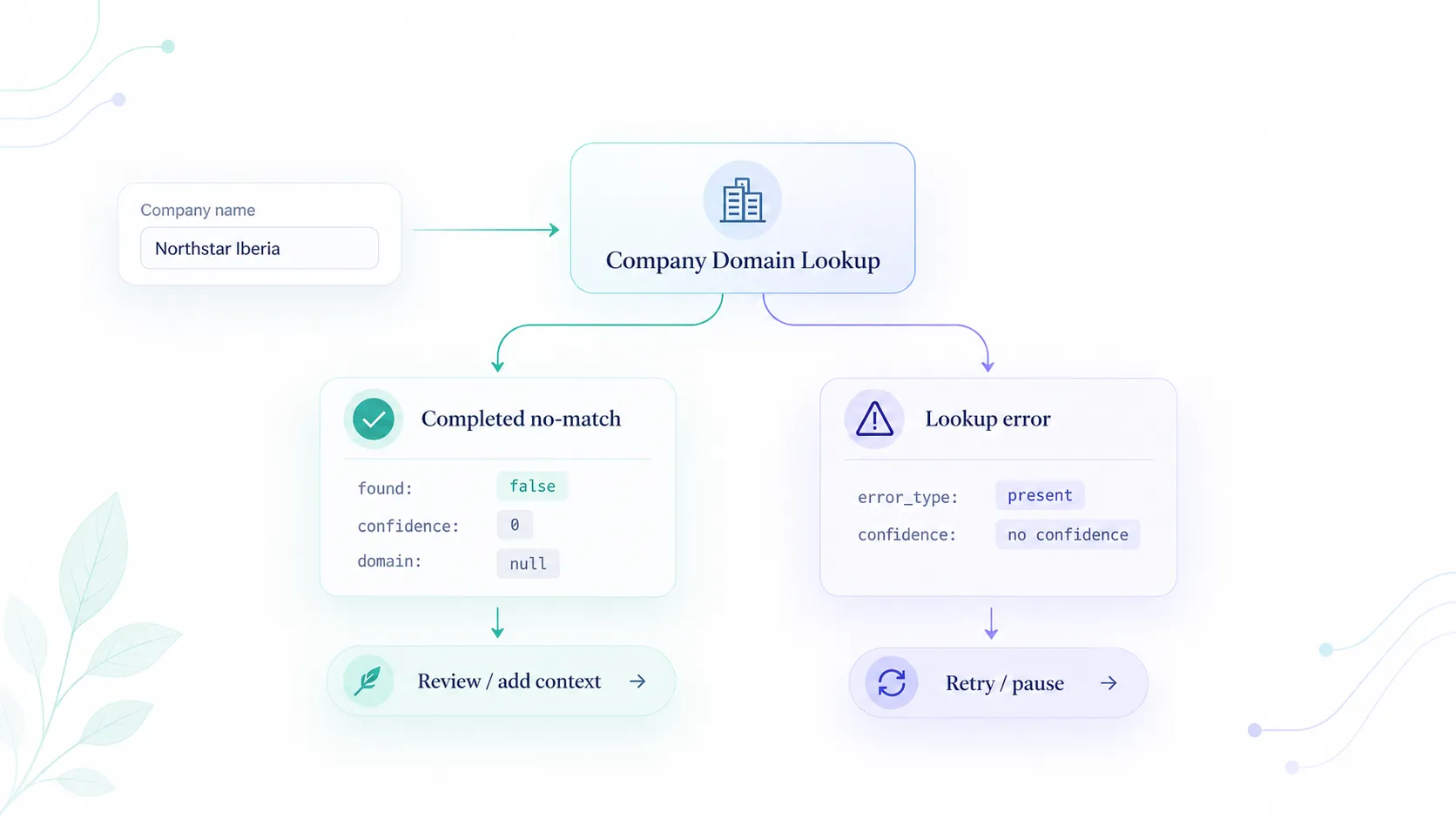
| No match | Store the no-match outcome. | Retry with better context, cleanup reporting. | Silent fallback to a guessed domain. |
There is no universal threshold that fits every B2B app. A domain used for a staging table can use a different rule than a domain used for CRM merges. The important part is to write the policy before automation scales.
Store Decision Evidence
A company-domain decision should leave a small audit trail. Recommended fields include:
- submitted company name;
- normalized company name;
- accepted or candidate domain;
- confidence score or confidence tier;
- live-domain status;
- match reasons or reason summary;
- source system and source record ID;
- requested downstream action;
- review state;
- decision timestamp;
- reviewer or policy version when applicable.
This evidence is useful for operators, support teams, and future tuning. If many medium-confidence records are later accepted, the policy may be too strict. If accepted records are often corrected later, the policy may be too broad for the action it controls.
Separate Real-Time, Batch, And Webhook Rules
Different sources need different handling.
A signup form should stay fast and may continue with a pending company-review state. A CSV import can run in batches and group results by confidence tier. A webhook should use an external event ID or organization ID as an idempotency key so retries do not create duplicate lookup work. A CRM cleanup workflow should treat matching as evidence, not as a one-click record merge.
The same Company Domain Lookup result can support all of those workflows, but the acceptance policy should reflect the source and the action. Source-specific rules keep domain matching practical instead of forcing every workflow through the same gate.
Keep Enrichment As A Handoff
Company domain matching and company data enrichment solve different problems. Matching answers, "Which official domain likely represents this company name?" Enrichment answers, "What company-level data should we attach after identity is clear?"
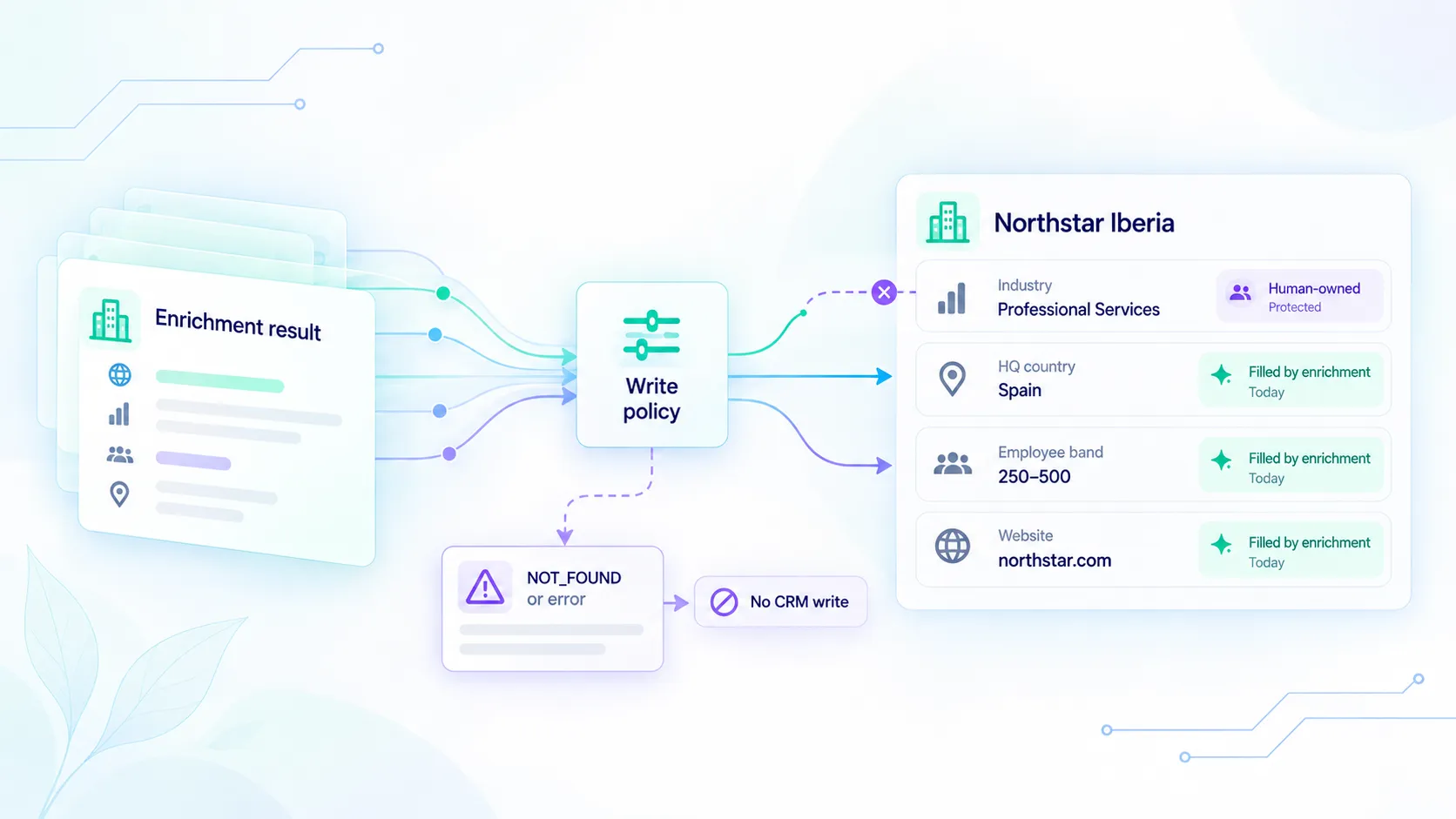
That product boundary matters. Send accepted domains into Elvesora Enrichment only after the matching decision is safe for the workflow. If the match is weak or ambiguous, hold enrichment until review or more context is available.
For a step-by-step enrichment sequence after the domain is known, see How to enrich company data with Elvesora. For the broader lookup foundation, see Company Domain Lookup: The First Step in Modern Company Prospecting and How to Find a Company's Domain by Name with Elvesora.
When Not To Automate
Do not automate a match when the evidence is unclear and the downstream action is hard to reverse.
Choose review or hold when the company name is generic, multiple domains look plausible, the selected domain is not live, the name conflicts with an existing trusted domain, the workflow may involve a parent or subsidiary, or the action would overwrite canonical fields, merge records, or change reporting keys.
The safe result is not failure. It is a review state that keeps the match useful without treating it as final.
Final Recommendation
The best company name-to-domain matching workflows preserve source data, normalize carefully, use confidence as a control, and store decision evidence. They do not treat a returned domain as permission to change every downstream system.
Start with Company Domain Lookup when the input is a company name and the domain is missing or uncertain. Use domain lookup pricing when evaluating self-serve usage. Connect the accepted domain to CRM hygiene, company-level enrichment, or routing only after the workflow has enough evidence for that action.
That structure makes company matching useful for B2B apps without letting uncertain identity data quietly spread through the product.