n8n: Resolve Company Domain Before Firmographic Enrichment
Wire n8n so Company Domain Lookup runs first, skip enrichment on no-match or lookup errors, then call Elvesora Enrichment with one accepted domain per item. Includes the community-node disclaimer.

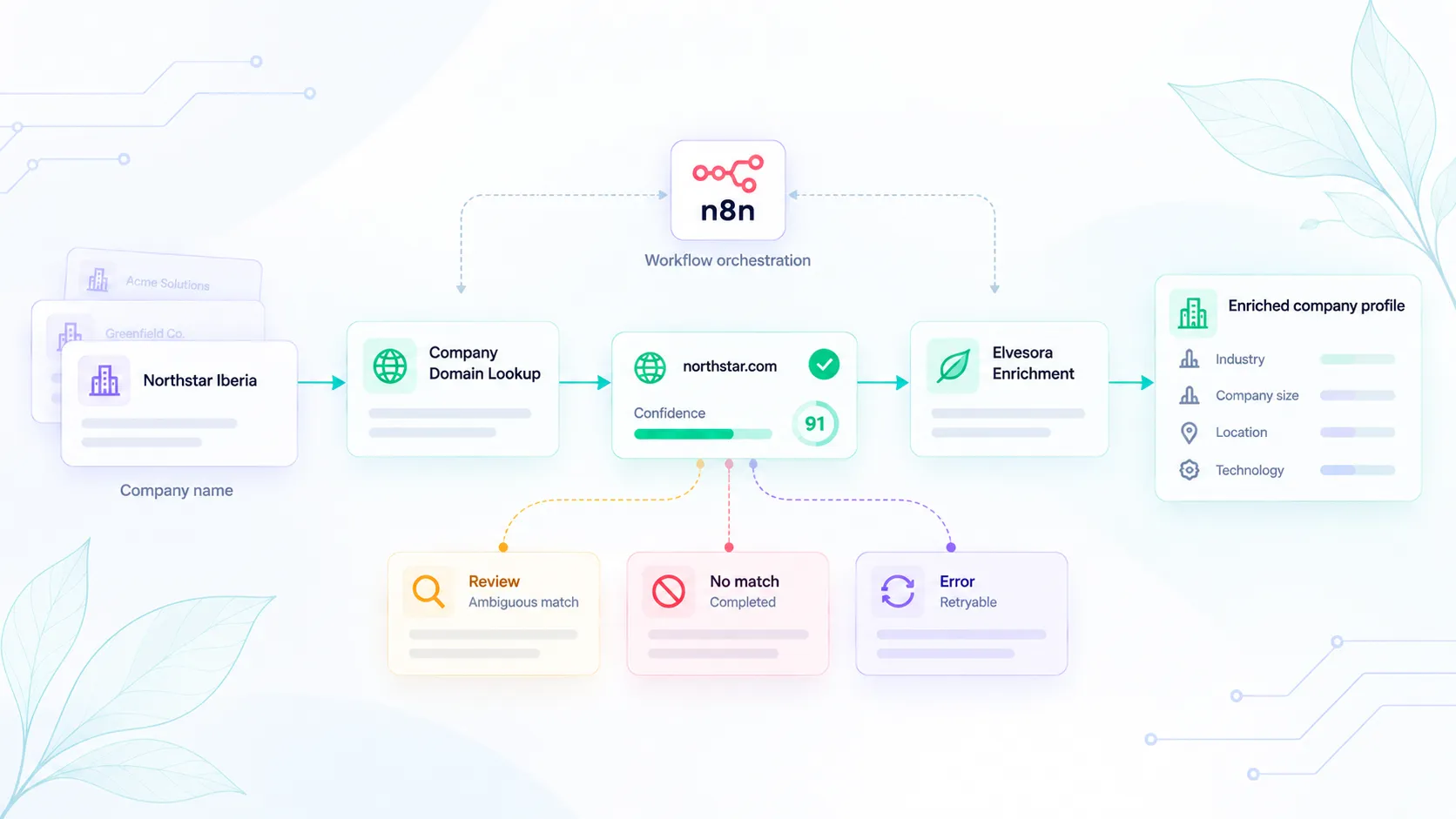
n8n is a common place to chain "find the company website" and "add firmographics."
If those steps run in the wrong order, you can enrich a guessed mailbox domain, send ambiguous matches downstream, or treat a completed no-match like a failed request.
This recipe is: company name → Company Domain Lookup → only then Elvesora Enrichment.
It follows Company Domain Lookup before company data enrichment. The difference is the n8n wiring.
Integration boundary
Elvesora publishes and maintains the Enrichment n8n community node (n8n-nodes-elvesora-enrichment). It is not built into, verified by, or endorsed by n8n.
Company Domain Lookup does not use the community node in this recipe. Call it through an n8n HTTP Request node using your Domain Lookup API key.
Build the n8n workflow
- Trigger (CRM webhook, spreadsheet, or schedule).
- Normalize the company name for lookup while preserving the original input. Trim whitespace and apply the same normalization rules you already use for imported company records.
- HTTP Request —
POSTCompany Domain Lookup withcompany_nameand optionaladditional_context. Set Response Format to JSON and enable Never Error so HTTP error bodies reach the IF branch. Leave Include Response Headers and Status off for the field paths below; if you enable it, read the API fields under$json.bodyinstead of$json. - IF
found === trueandconfidence_band === "high"(confidence85–100) → continue withdomainif this meets your workflow's acceptance policyfound === trueandconfidence_bandis"review"(60–84) or"low"(1–59) → review branch (no enrich)found === falseandconfidence_band === "no_match"(confidence === 0) → completed no-match branch (no enrich)- error envelope (
error_typeset, no confidence) → retry only ifretryable === true; otherwise pause or route to an error branch. Authentication, validation, and transport failures can lack these fields: handle them as errors, not no-match outcomes
- Elvesora Enrichment community node — one domain per item. If your acceptance policy is stricter than the API's high band, apply that additional
confidencethreshold before this node. - Map company fields into CRM. Do not write people or personal emails.
The Enrichment node accepts one domain per item, supports Simplified, Raw, or Selected Fields output, preserves HTTP 400 business outcomes as workflow data, supports Continue On Fail, and accepts an optional stable idempotency key.
For example, the HTTP Request body could be:
{
  "company_name": "Northstar Iberia",
  "additional_context": "Spain, reseller"
}
Keep the original company name on the n8n item. Write the lookup result to a separate field such as lookup_domain rather than replacing the source value.
Skip rules
Do not call Enrichment when:
- lookup returned a completed no-match
- lookup returned
usage_limit(retryable: false); pause the item until the lookup allowance renews or changes - the only identifier you have is a free-mail domain from a person
Enrichment NOT_FOUND means the domain was valid but company data was not available. The community node returns HTTP 400 business outcomes as normal workflow data, even with Continue On Fail off. Branch on result_type and do not overwrite CRM fields with nulls. Continue On Fail lets actual HTTP or transport failures continue as error items; it does not retry them.
Retry
- Lookup
rate_limited(HTTP 429) /lookup_invalid_response(HTTP 502): both returnretryable: true. Wait the top-level JSONretry_afterin seconds, then retry lookup only. The delay is 1–300 seconds forrate_limitedand 60 seconds forlookup_invalid_response. Bound the number of attempts; send exhausted retries to an error or review branch. - Enrichment: retry transient
SERVICE_UNAVAILABLE/UPSTREAM_ERRORresponses with HTTP 5xx, or transport failures, using bounded workflow-owned backoff. Retry enrichment only, with the same domain and idempotency key. Do not retry everyUPSTREAM_ERRORblindly: it can also represent an upstream 4xx. HTTP 429LIMIT_EXCEEDEDmeans pause until the enrichment allowance is restored. Enrichment does not promise the Lookupretryableorretry_afterfields. - Do not rerun a successful enrich or
NOT_FOUNDhoping for a different company.NOT_FOUNDis a completed enrichment outcome, not a request to guess another domain.
Generate and retain one Idempotency-Key per logical enrichment operation, then reuse it for retries of that same domain. A stored response can be replayed within the 24-hour cache window without another credit. Reusing that key for another domain returns HTTP 409 IDEMPOTENCY_KEY_CONFLICT.
Identifiers
Keep these workflow-owned fields on the n8n item JSON, mapping the API values into them:
source_record_id(the original CRM record ID or import row ID)company_namelookup_domain(nullable)lookup_status(found/no_match/error)lookup_confidence(fromconfidence; null on errors)lookup_error_type(fromerror_type, when present)enrichment_result_type(fromresult_type, when returned)enrichment_idempotency_key(your retained key for this logical operation)
Keep the original source identifier so the result can be written back without matching on company name. The Enrichment node preserves n8n item links but does not automatically copy the input JSON: explicitly map these fields from the linked source item or merge them back into the result. The public Enrichment contract does not declare a stable request or result ID; retain your own source ID and operation key. That makes CRM mapping boring on purpose.
Implementation checklist
- Preserve the original company name and source record ID.
- Resolve the company domain before calling Enrichment.
- Treat
found: falseas a completed no-match, not an API failure. - Keep ambiguous matches out of automatic enrichment.
- Retry Lookup and Enrichment independently, with bounded attempts; reuse the same enrichment idempotency key for the same logical operation.
- Do not retry completed
NOT_FOUNDenrichment results to search for another company. - Store lookup and enrichment states separately.
- Do not overwrite CRM fields with null enrichment values.
The lookup decides which company domain is safe to send downstream. Enrichment adds company data only after that identity step has completed. Keeping those operations separate prevents a guessed identifier from turning into enriched CRM data.