What Is Email Validation? Complete Guide for SaaS Teams
Email validation checks whether an email address is usable for a workflow. Learn syntax, domain, disposable, role, catch-all, review states, and SaaS implementation patterns.

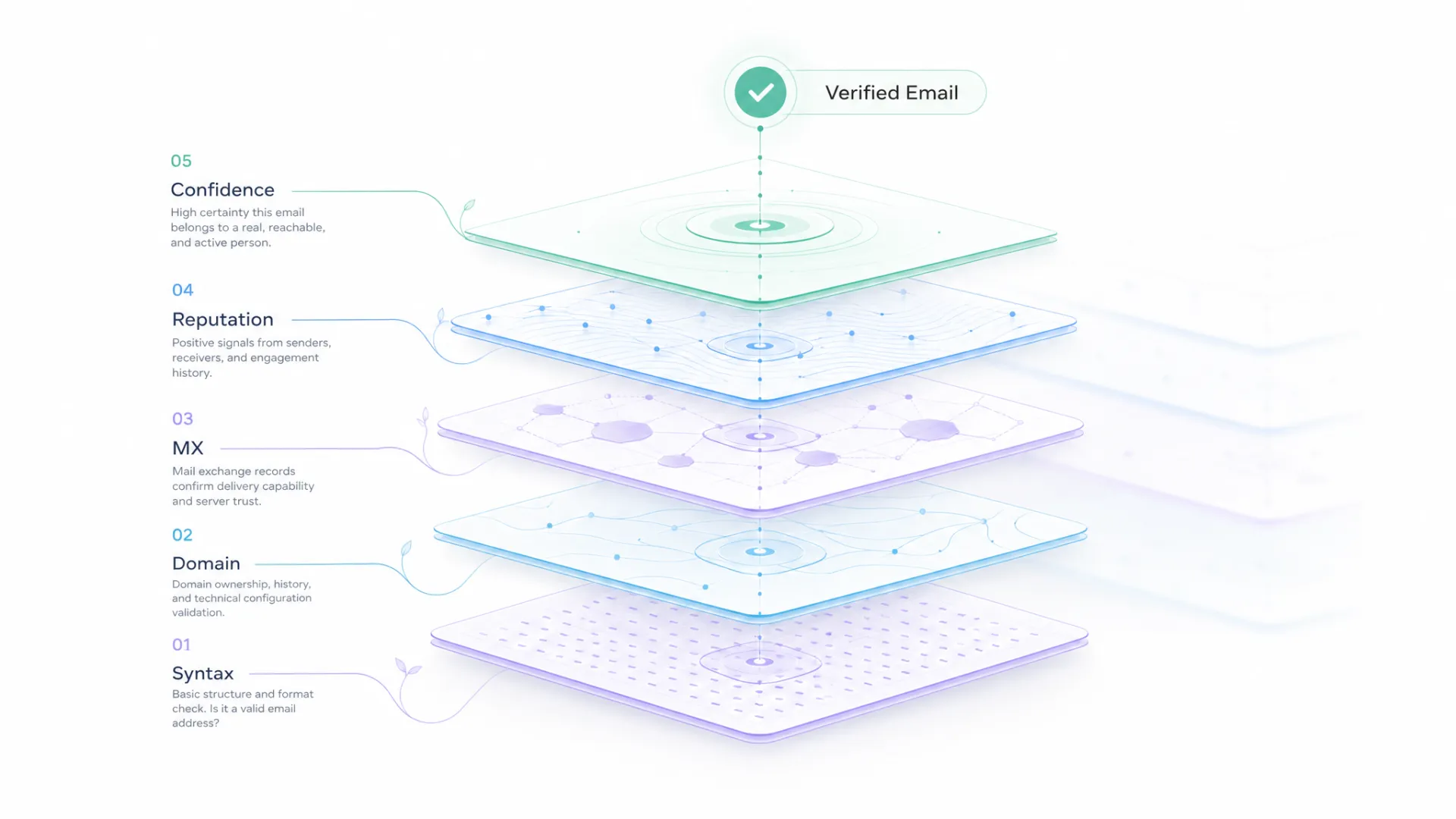
Email validation starts with checking whether an email address is technically valid. For most SaaS products, that's only the beginning. The real question is whether the address is acceptable for the workflow that follows. That means looking beyond syntax, but good validation goes further. It looks at domain quality, disposable domains, role accounts, catch-all behavior, mail-server signals where available, and the decision your application should make next.
For SaaS teams, email validation is not only a deliverability topic. It affects signup quality, workspace ownership, CRM hygiene, enrichment, routing, billing notices, support handoffs, and reporting. A bad email address can enter through a form and quietly spread through several systems.
A single email address may be accepted during signup, rejected during a CRM import, and still trigger downstream enrichment. Those differences rarely come from the email itself. They come from the rules around it.
The useful definition
Email validation helps an application decide whether an address should be allowed, reviewed, or blocked. Syntax validation checks whether the string looks like an email address. A validation API such as Soryxa adds domain and risk signals so the workflow can make a better decision.
A practical way to think about validation is as a sequence of decisions. First reject obvious syntax problems. Then check domain quality, disposable patterns, role accounts, catch-all behavior, and uncertainty. Finally, turn those signals into a decision the rest of the product can understand. That last step is where many teams get value: the same rule can protect signup, CRM intake, and downstream data-quality work.
Email validation vs email verification
The terms are often used together. In practice:
- Email validation is the wider workflow of deciding whether an address is acceptable.
- Email verification often means checking whether the address or domain appears deliverable.
A product team should not spend too much time arguing about the label. The real question is what the system needs to know before it acts.
If a signup form only checks syntax, it may accept test@example.com style throwaway records. If a CRM import only checks deliverability, it may still accept role accounts that are not useful for ownership. If a workflow blocks every uncertain result, it may reject good business domains that are catch-all.
Good validation separates signal from policy.
The next step is turning those signals into consistent product behavior. See How to Design Email Validation Rules for B2B Workflows for a practical framework.
The layers of email validation
Syntax
Syntax checks catch obvious mistakes. The address has to be shaped like an email address. In PHP, filter_var can help. In Laravel, the built-in email rule can help. In JavaScript, backend validation is still required because client-side checks can be bypassed.
Syntax checks are fast and inexpensive, so they usually run first.
Domain
The domain is the part after @. A domain check can tell the workflow whether the domain is shaped correctly and whether mail infrastructure appears to exist. Domain validation matters because the domain often becomes a business signal.
In B2B workflows, the domain can help with account matching, company identity, routing, enrichment, and fraud review. That is why Soryxa is positioned as email and domain validation, not only syntax checking.
Disposable detection
Disposable email services are useful for privacy, but they can be risky for product workflows that need durable accounts. A disposable address may be acceptable for reading a free resource. It may be unacceptable for account ownership, trial access, billing, or CRM creation.
The decision should match the action.
Role accounts
Role accounts include addresses such as info@, support@, admin@, and sales@. They can be legitimate. They can also be poor identifiers for a user.
A role account might be fine for a company billing contact. It might be risky for workspace ownership or identity-sensitive signup. Do not treat every role address the same.
Catch-all domains
A catch-all domain may accept many addresses even when a specific inbox does not exist. That makes verification harder. A catch-all result should usually create a review or cautious allow state, not a blind valid label.
Unknown results
Unknown is not the same as bad. Network errors, server behavior, and protective mail systems can make certainty impossible. A mature workflow keeps unknown separate from allowed and blocked.
Why SaaS teams need decisions
Why Email Validation Fails Without Clear Decision Rules covers this problem directly. Validation fails when every system interprets the same signal differently.
Example:
- signup allows a catch-all address;
- CRM import later marks it invalid;
- enrichment job still runs;
- sales routing ignores the warning;
- support sees a failed verification email;
- reporting counts the account as a valid signup.
No single step looks catastrophic. Together they create messy data.
Use one shared decision model:
| Decision | Meaning | Common handling |
|---|---|---|
| Allow | The address is good enough for this action | Continue workflow |
| Review | The address has uncertainty or workflow-specific risk | Continue with limits or queue review |
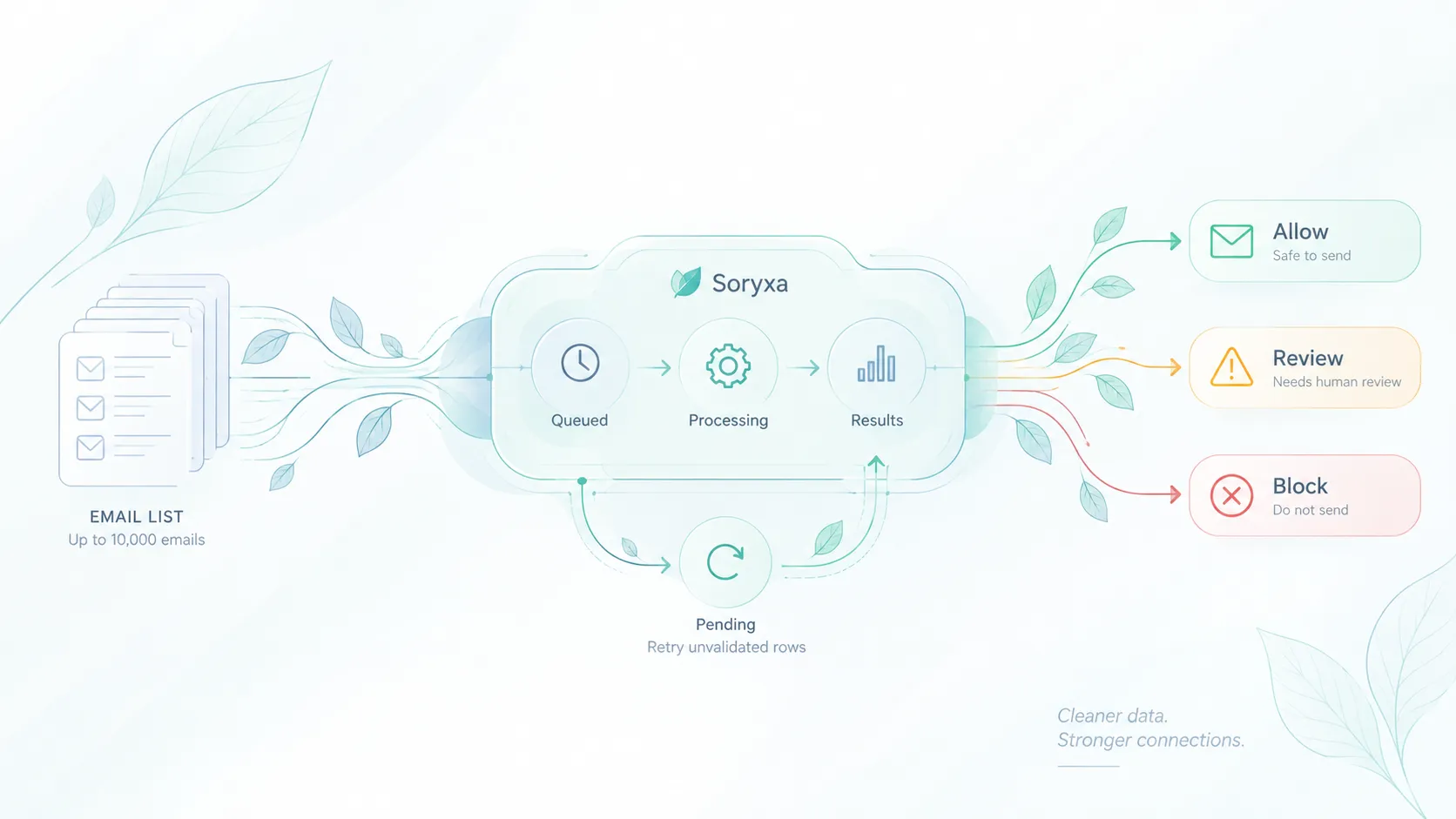
| Block | The address is not acceptable for this action | Ask for another address or stop the action |
Consistency becomes much easier when every system applies the same validation logic. We covered that challenge in What Happens When Email Validation Is Inconsistent Across Systems.
Where email validation belongs
Use email validation at the point where bad data would become expensive.
This is also why validation works best as part of a broader clean-data strategy rather than as an isolated form check. See How Email Validation Fits into Clean Data Workflows.
Common places:
- signup forms;
- invite flows;
- trial requests;
- CRM imports;
- CSV uploads;
- webhook-created contacts;
- billing contact updates;
- enrichment handoffs;
- support form submissions;
- marketing list cleanup.
Not every place needs the same strictness. A newsletter form can be lighter than a workspace owner field. A CRM cleanup job can preserve uncertain rows for review. A billing contact update may need stronger checks than a free content download.
Implementation examples by workflow
For a signup form, the product can check syntax immediately, call Soryxa, and decide whether the user can continue. A blocked result should use a plain message and ask for another address. A review result can let the user continue while limiting high-risk automation.
For a CSV import, the product should not stop the whole file because 8 percent of rows are uncertain. Group the imported rows by decision, show counts, and let the operator choose whether to import allowed rows first. Keep reviewed rows in a staging table with the validation reason attached.
For CRM cleanup, validation should not erase history. Store the previous email value, the validation response, the reviewer, and the final action. If a record is rejected, mark why. If it is reviewed and accepted, preserve that decision so the same address does not create repeated review work.
For enrichment handoffs, validate the email before it drives downstream data work. If the address is weak, hold the enrichment step or run company-level checks from a cleaner identity signal such as an accepted company domain.
Common misconceptions
Email validation is not the same as sending a confirmation email. A confirmation email proves that someone can access an inbox at that moment. Validation helps decide whether the address should enter the workflow in the first place.
Email validation is also not the same as deliverability management. Deliverability includes sender reputation, DNS setup, campaign behavior, and inbox placement. Validation can reduce weak addresses, but it does not replace good sending practices.
Finally, email validation is not a one-time project. Domains change, catch-all behavior changes, users mistype addresses, and imports bring old records back into the system. Treat validation as a standing data-quality control.
A starter validation policy
Use this as a first draft, then adjust it to the product:
| Case | Signup | CRM import | Billing contact |
|---|---|---|---|
| Syntax failure | Block | Reject row | Block |
| Disposable | Block | Review | Review |
| Role address | Review | Allow or review | Allow |
| Catch-all | Review | Review | Review |
| Unknown | Retry, then review | Review | Review |
| Strong business address | Allow | Allow | Allow |
The policy matters because one address can be acceptable for one job and risky for another. A role address can be fine for a shared billing inbox but weak for a workspace owner. A catch-all domain can be common in legitimate businesses but still hard to verify confidently. A disposable address may be acceptable for anonymous browsing, but not for account creation.
This table also helps developers implement validation consistently. Instead of every controller, import job, and CRM sync inventing its own behavior, the application can call the same validation service and apply workflow-specific rules.
How Soryxa fits
Soryxa is useful when email validation has to support product decisions. It is built for workflows that need risk signals and decision handling, not just a syntax pass.
Use Soryxa when:
- signups need protection from weak addresses;
- CRM hygiene depends on consistent rules;
- data enrichment should wait for acceptable records;
- role, disposable, catch-all, and uncertain states need different handling;
- developers need an API that can be wired into backend services.
If you're implementing validation in PHP or Laravel applications, the published Soryxa SDK Guide walks through practical integration examples.
What to store
Store validation as an event and as a current state.
Useful fields:
- email;
- normalized email;
- validation provider;
- validation timestamp;
- syntax status;
- domain status;
- disposable status;
- role status;
- catch-all status;
- raw response;
- normalized decision;
- decision reason;
- source workflow.
This makes audits easier. If a customer asks why an address was blocked, support can see the reason. If a product manager wants to change the rule for catch-all domains, developers can estimate the impact.
Metrics to track
Track:
- validation volume;
- allowed count;
- review count;
- blocked count;
- disposable rate;
- role-address rate;
- catch-all rate;
- unknown rate;
- signup completion rate after review;
- CRM records prevented or corrected.
These metrics make validation a product-quality system instead of a hidden form check.
Final recommendation
Treat email validation as a workflow decision layer. Syntax checks are necessary, but they are not enough. Domain and risk signals matter because email addresses move into systems that make decisions.
Start with one high-impact path, such as signup or CRM import. Define allow, review, and block. Store the signals. Then expand the same rules to the other places where email data enters the business.