Company Domain Lookup for B2B Signup and Intake Workflows
Follow a B2B signup from submitted company name to domain evidence, account matching, review, and final outcome without treating a lookup as proof of account membership.

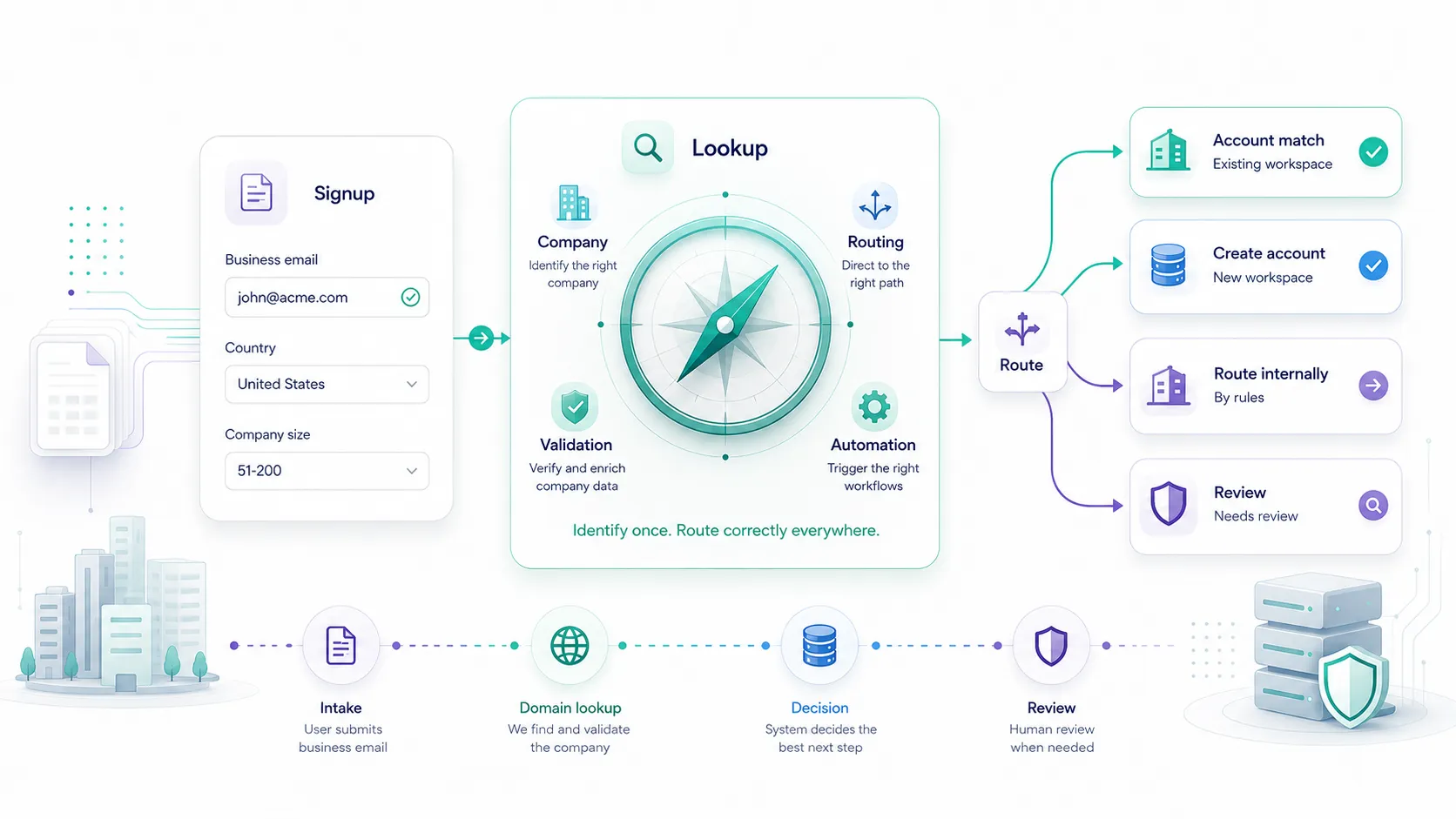
A signup form can validate every required field and still have no idea which company the user actually represents.
The submitted value may be a legal entity, product brand, parent company, regional office, workspace name, or abbreviation. If the application treats that string as trusted identity, it can create duplicate workspaces, attach a signup to the wrong account, route a lead incorrectly, or enrich the wrong company.
Company domain lookup gives the workflow a stronger identity signal. It does not prove that the person owns the company, and it should not decide account membership by itself.
This guide follows one signup from payload to outcome and shows which parts Elvesora returns and which parts your application must own.
Put lookup after form validation, before company-dependent automation
A practical signup sequence is:
- Validate the form's required fields and consent.
- Apply the application's email-quality and ownership checks.
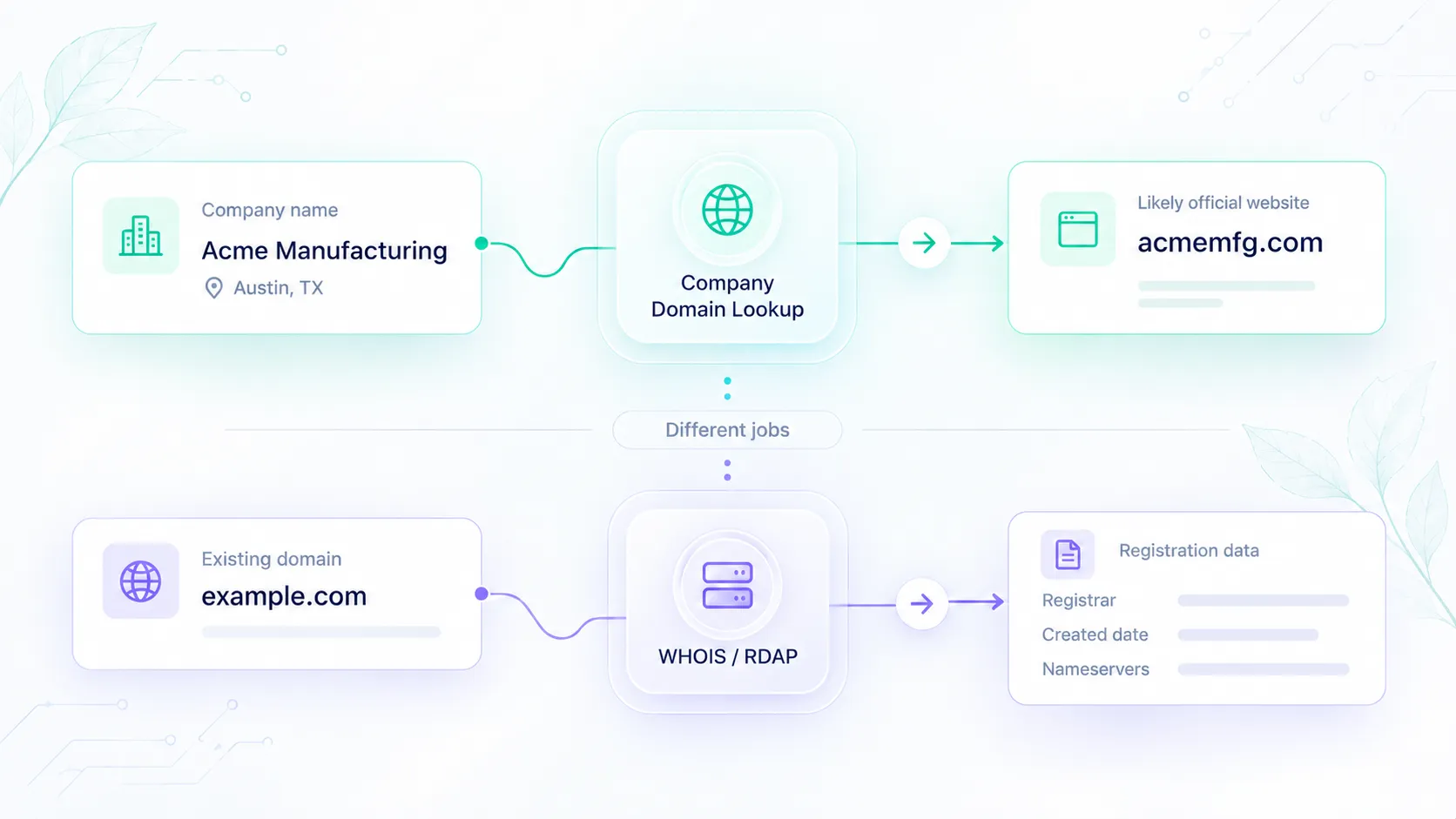
- Resolve the submitted company name to a likely official domain.
- Compare that evidence with existing accounts and invitations.
- Apply an action-specific company policy.
- Let the user continue, or hold only the company-dependent actions that need stronger evidence.
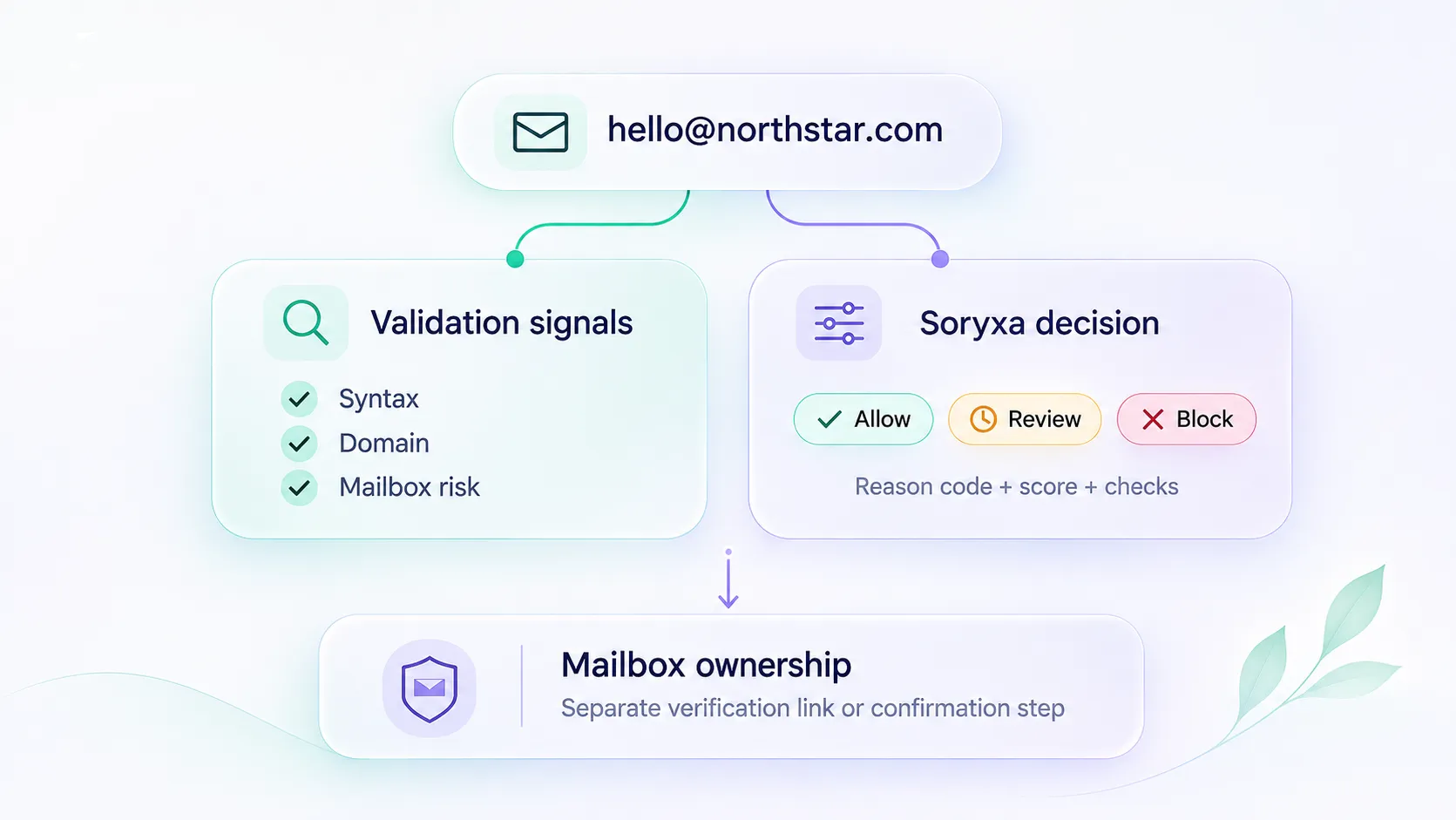
Email and company checks answer different questions:
| Layer | Question | What it does not prove |
|---|---|---|
| Form validation | Are the required values present and correctly shaped? | That the values are truthful. |
| Email validation | Does the address meet the application's syntax and risk policy? | That the user represents the submitted company. |
| Email ownership | Can the user complete a verification or invitation step? | That the free-text company name maps to a specific legal entity. |
| Company domain lookup | Which official domain most likely matches the company name and context? | That the user may join, merge, or administer an existing account. |
| Account policy | What may the signup do with the evidence? | Nothing outside the rules you implement. |
Use Soryxa's signup-validation workflow for the adjacent email layer. Use Company Domain Lookup for company-name-to-domain evidence.
Start with an application-owned signup payload
Suppose a user submits:
{
  "signup_id": "signup_01K0P9D5C8",
  "name": "Ava Stone",
  "email": "ava@acme.com",
  "company_name": "Acme Corporation",
  "country": "United States",
  "source": "self_serve_trial"
}
This is your application's payload. signup_id, name, email, country, and source are not Company Domain Lookup request fields.
After basic validation, build the narrower Elvesora request:
{
  "company_name": "Acme Corporation",
  "additional_context": "United States"
}
additional_context is a short string for company-level disambiguation. The application keeps source: "self_serve_trial" in its own record rather than sending workflow metadata that does not help distinguish the company. Do not put passwords, authentication tokens, unnecessary personal data, or the entire form payload into this field.
Make the request in server-side code:
POST https://prospecting.elvesora.com/api/prospecting/company
Authorization: Bearer YOUR_API_KEY
Content-Type: application/json
Never ship the credential in a browser bundle or mobile application.
Read the lookup as evidence
The Domain Lookup API docs use this response shape:
{
  "success": true,
  "company_name": "Acme Corporation",
  "normalized_company_name": "acme corporation",
  "domain": "acme.com",
  "confidence": 92,
  "is_live": true,
  "reasons": ["Company name matches website brand"],
  "lower_reasons": [],
  "cached": false,
  "found": true,
  "remaining": 1249,
  "limit": 1250
}
This is a documented example, not a lookup performed for this article.
The response gives the application several independent signals:
foundtells you whether a candidate domain was identified.confidencehelps decide how much automation the match can support.domainis the likely official company domain when a match exists.is_liveadds operational evidence about the domain.reasonsandlower_reasonsexplain why the match was selected or weakened.cachedshows whether the lookup reused a previous result.
Do not reduce that object to domain alone.
Apply two decisions, not one
A signup usually needs separate decisions for user access and company automation.
Decision 1: User access
If your product does not require trusted company identity before access, a lookup review or temporary failure should not automatically block signup. Create the user or workspace with a pending company-identity state and limit only the actions that depend on the company match.
Decision 2: Company automation
Use the current Elvesora starting bands:
| Lookup evidence | Company-automation state | Example handling |
|---|---|---|
found: true, confidence 85–100, other evidence agrees |
accepted_for_low_risk |
Store a candidate domain, search for existing accounts, or prepare enrichment. |
| Confidence 60–84 | needs_review |
Continue signup; hold ownership, canonical-domain writes, and enrichment. |
| Confidence below 60 | investigate |
Preserve the submitted name; ask for context or review later. |
found: false |
no_match |
Keep the domain blank; do not guess. |
401 or 422 |
configuration_error or invalid_input |
Correct configuration or input; do not retry unchanged. |
429, 503, or timeout |
pending_retry |
Continue signup when allowed and reschedule lookup. |
Joining an existing account, merging records, changing ownership, or overwriting a trusted domain all require stricter checks than storing a candidate domain.
Complete the example outcome
For the documented 92 confidence response:
- The application records a high-confidence, live, non-cached company match.
- It searches existing accounts whose trusted domain is
acme.com. - It checks whether the signup has a valid invitation or another account-membership proof.
- It applies one of these outcomes:
| Existing account | Membership proof | Signup outcome | Company outcome |
|---|---|---|---|
| No account found | Not applicable | Create the user and a new workspace. | Store acme.com as the candidate domain; allow low-risk enrichment preparation. |
| Account found | Valid invitation or approved membership flow | Create the user and continue the authorized join. | Record the domain evidence with the association. |
| Account found | No membership proof | Create or continue the user according to product policy, but do not auto-join. | Route the possible account match to review. |
| Several accounts found | Any | Avoid an automatic association. | Review account hierarchy and trusted domains. |
The lookup narrows company identity, while invitation and authorization remain application responsibilities.
For this article's primary path, assume no existing account is found. The resulting audit record is:
{
  "signup_id": "signup_01K0P9D5C8",
  "submitted_company_name": "Acme Corporation",
  "submitted_email_domain": "acme.com",
  "lookup": {
    "found": true,
    "domain": "acme.com",
    "confidence": 92,
    "is_live": true,
    "cached": false,
    "reasons": ["Company name matches website brand"],
    "lower_reasons": []
  },
  "policy": {
    "version": "signup-company-policy-2026-07",
    "user_access": "allowed",
    "company_identity": "accepted_for_low_risk",
    "allowed_actions": [
      "create_workspace",
      "store_candidate_domain",
      "prepare_enrichment"
    ],
    "blocked_actions": [
      "join_existing_account_without_membership_proof",
      "merge_accounts",
      "overwrite_trusted_domain"
    ]
  }
}
Only the nested lookup evidence corresponds to the Company Domain Lookup response. The surrounding signup, policy, allowed-action, and blocked-action fields belong to your application.
Implementation logic
The policy can remain small and explicit. This example accepts either the normalized lookup states used in the failure table or a raw successful response with found:
export function decideSignupCompany({
  lookup,
  existingAccounts = [],
  hasMembershipProof = false,
}) {
  if (
    lookup.state === 'rate_limited' ||
    lookup.state === 'retry_later' ||
    lookup.state === 'pending_retry'
  ) {
    return {
      user_access: 'allowed',
      company_identity: 'pending_retry',
      action: 'create_without_company_automation',
    };
  }

  if (
    lookup.state === 'configuration_error' ||
    lookup.state === 'invalid_input' ||
    lookup.state === 'request_failed'
  ) {
    return {
      user_access: 'allowed',
      company_identity: lookup.state,
      action: 'hold_company_automation',
    };
  }

  if (lookup.state === 'no_match' || lookup.found === false) {
    return {
      user_access: 'allowed',
      company_identity: 'no_match',
      action: 'create_and_review_later',
    };
  }

  const isMatched =
    lookup.state === 'matched' || lookup.found === true;
  const domain =
    typeof lookup.domain === 'string' ? lookup.domain.trim() : '';

  if (!isMatched || domain === '') {
    return {
      user_access: 'allowed',
      company_identity: 'needs_review',
      action: 'hold_company_automation',
    };
  }

  const confidence =
    typeof lookup.confidence === 'number' &&
    Number.isFinite(lookup.confidence) &&
    lookup.confidence >= 0 &&
    lookup.confidence <= 100
      ? lookup.confidence
      : null;

  if (
    confidence === null ||
    confidence < 85 ||
    lookup.is_live !== true ||
    lookup.cached === true
  ) {
    return {
      user_access: 'allowed',
      company_identity:
        confidence !== null && confidence < 60
          ? 'investigate'
          : 'needs_review',
      action: 'hold_company_automation',
    };
  }

  if (existingAccounts.length === 0) {
    return {
      user_access: 'allowed',
      company_identity: 'accepted_for_low_risk',
      action: 'create_workspace',
    };
  }

  if (
    existingAccounts.length === 1 &&
    hasMembershipProof === true
  ) {
    return {
      user_access: 'allowed',
      company_identity: 'accepted_for_authorized_join',
      action: 'join_existing_account',
    };
  }

  return {
    user_access: 'allowed',
    company_identity: 'needs_review',
    action: 'do_not_auto_join',
  };
}
This example assumes the product can allow user access while company identity is pending. If your regulated, contractual, or abuse-prevention requirements demand a verified organization before access, make that a documented product decision rather than silently deriving it from the domain score.
Make ownership boundaries explicit
| Field or behavior | Owner |
|---|---|
company_name, optional additional_context request |
Shared contract: application sends, Elvesora receives |
found, domain, confidence, is_live, reasons, lower_reasons, cached |
Elvesora lookup evidence |
| Signup ID, email domain, source form, existing-account search | Customer application |
| Account association, invitation check, authorization | Customer application |
allowed, needs_review, pending_retry, blocked actions |
Customer policy |
| Retry queue, idempotency, audit record, retention | Customer application |
| Enrichment handoff after acceptance | Customer workflow using Elvesora Enrichment |
This table prevents a useful application design from being mistaken for undocumented product behavior.
Design the review experience
A reviewer needs enough evidence to decide without repeating the lookup manually. Show:
- submitted and normalized company names;
- submitted email domain;
- candidate company domain;
- confidence, live status, cached status, reasons, and lower reasons;
- matching existing accounts and their trusted domains;
- the requested action;
- what will happen if the reviewer accepts or rejects.
Offer narrow actions:
- accept for this signup;
- store candidate only;
- choose a different existing account;
- create a separate workspace;
- ask the user for context;
- reject the match.
Do not present a single “approve” button if it is unclear whether approval joins an account, starts enrichment, overwrites a domain, or merely stores a suggestion.
Failure handling should preserve the signup
Keep transport and match-quality states separate:
401needs a configuration owner;422needs input correction;429needs allowance-aware delayed retry;503and timeouts need bounded retry;found: falseneeds context or review, not infrastructure retry;- medium and low confidence are valid lookup outcomes, not API failures.
Use signup_id as an idempotency anchor in your own worker. A retry must update the same pending company-identity record rather than creating a second account or lookup workflow.
Privacy and security checklist
- Call the API from the backend.
- Send only the company context needed to disambiguate the name.
- Do not put passwords, tokens, or unrelated profile data into
additional_context. - Redact or hash email addresses in operational logs when the full value is unnecessary.
- Restrict access to account-match and reviewer evidence.
- Define retention for raw signup and lookup evidence.
- Keep invitation and authorization decisions outside the domain-lookup policy.
Measure whether the policy helps
Track outcomes rather than lookup volume alone:
- signup completion rate by lookup state;
- percentage of signups held for company review;
- accepted and rejected review outcomes;
- existing-account associations reversed later;
- duplicate workspaces created after a high-confidence match;
- lookup timeouts and rate limits;
- time from signup to resolved company identity;
- enrichment jobs delayed because company identity was unclear.
Compare by source form and requested action. A threshold that works for storing a candidate domain may still be unsafe for joining an existing customer account.
Implementation checklist
- Validate the form before lookup.
- Keep email validation, email ownership, company lookup, and account authorization separate.
- Send only
company_nameand useful shortadditional_context. - Read
foundbefore usingdomain. - Use confidence as a 0–100 routing signal.
- Preserve
reasons,lower_reasons,is_live, andcached. - Let signup continue with pending company identity where product policy permits.
- Require membership proof before joining an existing account.
- Store the application policy version and final action.
- Test high, medium, low, no-match, rate-limit, unavailable, and duplicate-account paths.
Once this workflow is in place, the same company identity can safely support enrichment, CRM matching, routing, and other downstream automation.